
How to Unclaim or Reset Your Satisfactory Server | Change Admin Password and Settings Without Wiping Saves
Unclaim - Reset Admin Password — Satisfactory
Section titled “Unclaim - Reset Admin Password — Satisfactory”When you first join the server, you set an admin password and choose a server name. To undo this and be able to create a new server, you will need to unclaim the server. This will not delete any save files on the server.
- Login to nitro.evlbox.com and find your server.
- Click the “Files” tab.
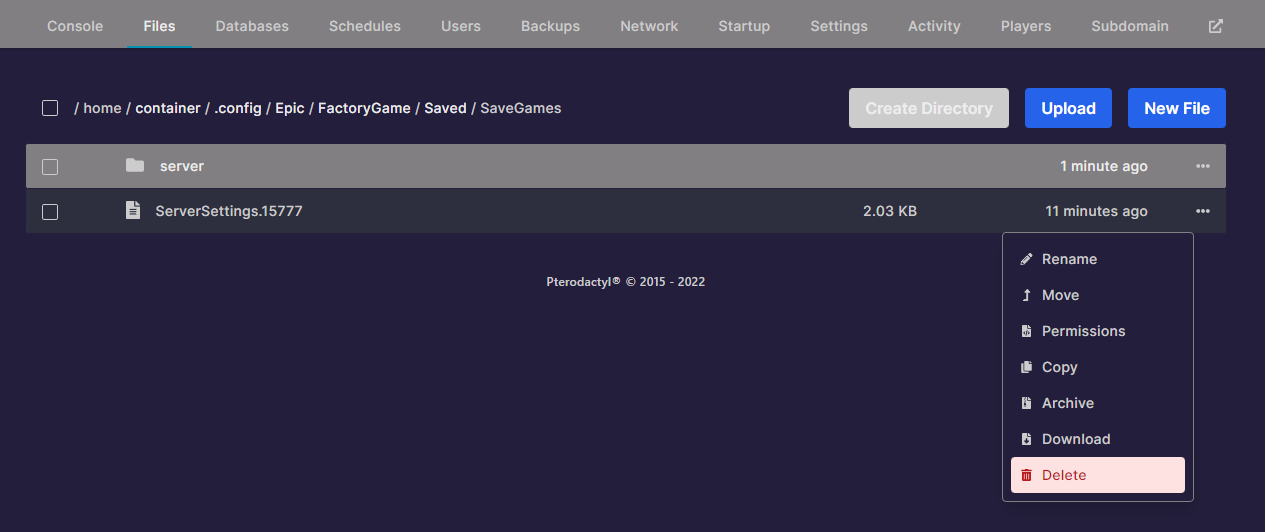
- Browse to this directory: .config/Epic/FactoryGame/Saved/SaveGames
- Delete the only ServerSettings file in this directory (note the trailing digits may not match this screenshot)
- Restart the server. The server can now be claimed by the next person to join it.