
How to Change Server Settings
Server Settings
Section titled “Server Settings”Palworld allows players to adjust several World Settings. This can be done in game for a single player game, but for your dedicated server these are all managed from the Startup tab in the Nitro control panel.
How to Use the Configuration Builder
Memory Leak Issues and Server Settings
How to Use the Configuration Builder
Section titled “How to Use the Configuration Builder”Every setting from the PalWorldSettings.ini file is available in the “Startup” section of the Nitro control panel - there is no need to edit the file directly. Settings with a fixed set of choices show as dropdowns, and the rest are text fields.
-
Login to the Nitro Panel, go to the console and stop your server.
-
Click on the startup tab. You can now edit any settings you like, and on server start, they will be added to your PalWorldSettings.ini file for you automatically.
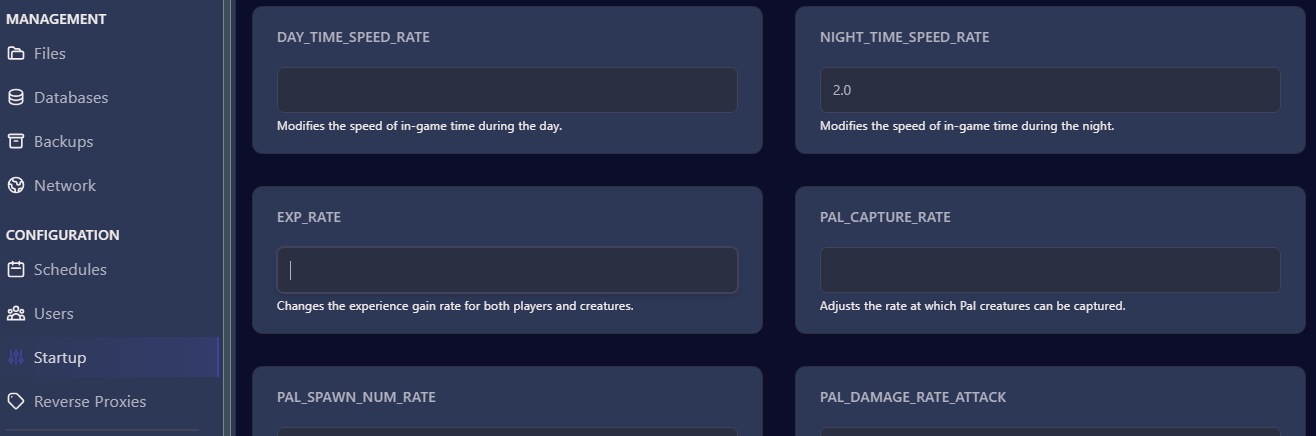
- To apply the changes, go to the console tab and Start your server.
Available Settings
Section titled “Available Settings”To see full details on what each setting does, please see the official guide.
Server
Section titled “Server”| Setting | Default | Description |
|---|---|---|
| Auto Update | 1 |
Auto update the server on start. |
| Server Name | EVLBOX Palworld Server |
The name of the server as shown in the server browser. |
| Server Description | Hosted by EVLBOX |
The description of the server. |
| Max Players | 32 |
Maximum number of players that can join the server. |
| Server Password | *(empty)* |
If specified, players must provide this password to join the server. Leave empty for no password. |
| Admin Password | Changeme |
Password to gain access to administrator commands on the server. CHANGE THIS before inviting players - anyone who knows it can run admin commands in-game. |
| Community Server (Public Lobby) | 0 |
Registers the server on the in-game community server list. REQUIRED for PS5 and Xbox players to join - consoles cannot connect by IP address. Off by default so new servers start unlisted; turn on for console crossplay or a public listing. |
| Crossplay Platforms | Steam+Xbox+PS5+Mac |
Which platforms can join the server. Steam+Xbox+PS5+Mac allows everyone (recommended). Steam+Mac is PC-only crossplay, Xbox+PS5 is console-only. Console players also require the Community Server setting to be On. |
| Server Region | NA |
Region label for the server. |
| Use Authentication | True |
Enables or disables server authentication. |
| Ban List URL | https://api.palworldgame.com/api/banlist.txt |
Sets the URL for the server’s ban list. |
| Use Backup Save Data | True |
Enables or disables the server’s built-in automatic save backups. |
| Auto Save Interval | 30.000000 |
Time between world auto-saves, in seconds. |
| Show Player List | False |
Enables or disables showing the player list in the server browser. |
| Chat Messages Per Minute | 10 |
Maximum number of chat messages a player can send per minute. |
Game Rules
Section titled “Game Rules”| Setting | Default | Description |
|---|---|---|
| Difficulty | None |
Adjusts the overall difficulty of the game. |
| Death Penalty | All |
Defines the penalty upon player death. Valid values: None, Item, ItemAndEquipment, All. |
| Hardcore Mode | False |
Enables or disables hardcore mode (permanent player death). |
| Character Recreate In Hardcore | False |
Allows players to recreate their character after dying in hardcore mode. |
| Pal Loss On Death | False |
Enables or disables permanently losing Pals when they die. |
| Enable PvP | False |
Enables or disables player versus player (PvP) mode. |
| Enable Player-to-Player Damage | False |
Enables or disables player-to-player damage. |
| Enable Friendly Fire | False |
Enables or disables friendly fire. |
| Is Multiplay | False |
Enables or disables multiplayer mode. |
| Max Co-op Players | 4 |
Sets the maximum number of cooperative players in a session. |
| Setting | Default | Description |
|---|---|---|
| EXP Rate | 1.000000 |
Changes the experience gain rate for both players and creatures. |
| Work Speed Rate | 1.000000 |
Adjusts the overall work speed in the game. |
| Day Time Speed Rate | 1.000000 |
Modifies the speed of in-game time during the day. |
| Night Time Speed Rate | 1.000000 |
Modifies the speed of in-game time during the night. |
| Pal Capture Rate | 1.000000 |
Adjusts the rate at which Pal creatures can be captured. |
| Pal Spawn Rate | 1.000000 |
Adjusts the rate at which Pal creatures spawn. |
| Pal Egg Hatching Time | 72.000000 |
Sets the default hatching time (hours) for the largest Pal eggs. |
| Pal Damage Rate (Attack) | 1.000000 |
Fine-tunes Pal creature damage dealt. |
| Pal Damage Rate (Defense) | 1.000000 |
Fine-tunes Pal creature damage received. |
| Pal Stomach Decrease Rate | 1.000000 |
Adjusts the rate at which Pal creature stomach decreases. |
| Pal Stamina Decrease Rate | 1.000000 |
Adjusts the rate at which Pal creature stamina decreases. |
| Pal HP Regen Rate | 1.000000 |
Adjusts the rate of automatic Pal creature health regeneration. |
| Pal HP Regen Rate (Sleeping) | 1.000000 |
Adjusts the rate of automatic Pal creature health regeneration during sleep. |
| Player Damage Rate (Attack) | 1.000000 |
Fine-tunes player damage dealt. |
| Player Damage Rate (Defense) | 1.000000 |
Fine-tunes player damage received. |
| Player Stomach Decrease Rate | 1.000000 |
Adjusts the rate at which the player’s stomach decreases. |
| Player Stamina Decrease Rate | 1.000000 |
Adjusts the rate at which the player’s stamina decreases. |
| Player HP Regen Rate | 1.000000 |
Adjusts the rate of automatic player health regeneration. |
| Player HP Regen Rate (Sleeping) | 1.000000 |
Adjusts the rate of automatic player health regeneration during sleep. |
World and Items
Section titled “World and Items”| Setting | Default | Description |
|---|---|---|
| Enable Invader Enemies | True |
Turns raids on your base by invader enemies on or off. |
| Enable Predator Boss Pals | True |
Enables or disables predator boss Pals appearing in the wild. |
| Aim Assist (Controller) | True |
Enables or disables aim assist for controllers. |
| Aim Assist (Keyboard) | False |
Enables or disables aim assist for keyboard and mouse. |
| Enable Non-Login Penalty | True |
Enables or disables penalties for players who have not logged in. |
| Enable Fast Travel | True |
Enables or disables fast travel. |
| Select Start Location By Map | True |
Enables or disables the selection of starting locations on the map. |
| Player Persists After Logout | False |
Enables or disables players remaining in the world after logout. |
| Item Weight Rate | 1.000000 |
Adjusts the weight of items. |
| Item Corruption Multiplier | 1.000000 |
Adjusts how quickly food spoils. |
| Equipment Durability Damage Rate | 1.000000 |
Adjusts how quickly equipment loses durability. |
| Collection Drop Rate | 1.000000 |
Adjusts the drop rate of collected items. |
| Collection Object HP Rate | 1.000000 |
Adjusts the health of collectible objects. |
| Collection Object Respawn Rate | 1.000000 |
Adjusts the respawn speed of collectible objects. |
| Enemy Drop Item Rate | 1.000000 |
Adjusts the drop rate of items from defeated enemies. |
| Max Dropped Items | 3000 |
Sets the maximum number of dropped items in the world. |
| Max Dropped UNKO Items | 100 |
Sets the maximum number of dropped UNKO items in the world. |
| Dropped Item Despawn Hours | 1.000000 |
Sets the maximum time items remain in the world after being dropped. |
| Active UNKO | False |
Activates or deactivates UNKO. |
| Supply Drop Interval | 180 |
Interval between supply drops, in minutes. |
Building, Bases and Guilds
Section titled “Building, Bases and Guilds”| Setting | Default | Description |
|---|---|---|
| Build Object Damage Rate | 1.000000 |
Adjusts the rate at which built objects take damage. |
| Build Object Deterioration Rate | 1.000000 |
Adjusts the rate at which built objects deteriorate. Set to 0 to disable structure decay. |
| Build Object HP Rate | 1.000000 |
Adjusts the health of built structures. |
| Build Area Limit | False |
Enables or disables the restriction on building in overlapping base areas. |
| Max Buildings Per Base | 0 |
Maximum number of buildings per base. 0 means unlimited. |
| Max Base Camps | 128 |
Sets the maximum number of base camps that can be built. |
| Max Bases Per Guild | 4 |
Sets the maximum number of base camps per guild. |
| Max Base Camp Workers | 15 |
Sets the maximum number of worker Pals in a base camp. |
| Max Guild Players | 20 |
Sets the maximum number of players in a guild. |
| Auto Reset Inactive Guilds | False |
Automatically resets guilds with no online players. |
| Inactive Guild Reset Hours | 72.000000 |
Sets the time after which guilds with no online players are automatically reset. |
| Defend Other Guild Players | False |
Enables or disables the defense of other guild players. |
| Pickup Other Guild Death Drops | False |
Enables or disables the pickup of death penalty drops from other guilds. |
| Hide Other Guild Base Area FX | False |
Hides the base camp area effect of other guilds. |
Advanced
Section titled “Advanced”| Setting | Default | Description |
|---|---|---|
| Randomizer Type | None |
Pal randomizer mode. None = no randomization, Region = randomize by region, All = completely random. |
| Randomizer Seed | *(empty)* |
Seed used by the Pal randomizer. Leave empty for a random seed. |
| Randomize Wild Pal Levels | False |
If True, wild Pal levels are fully randomized. If False, randomized levels stay tuned to the area. |
| Allow Global Palbox Export | True |
Allows saving Pals to the global palbox. |
| Allow Global Palbox Import | False |
Allows importing Pals from the global palbox. |
Memory Leak Issues and Server Settings
Section titled “Memory Leak Issues and Server Settings”One thing that seems to be having a postive effect on the memory leak issues is disabling the enemy invading option. This will turn off enemy raids on your base in game.
- To turn raids off, set “Enable Invader Enemies” in the Startup tab to False.
Existing Game Data and Settings Changes
Section titled “Existing Game Data and Settings Changes”If you would like to start a new game on your server after you have applied the settings, you will need to delete the save game data.
See Article - How to Delete and Archive Save Data for more information