
How to add Mods to Foundry Dedicated Server
How to Add Mods to Your Foundry Server
Section titled “How to Add Mods to Your Foundry Server”Want to spice up your Foundry server with mods? This guide walks you through the step-by-step process of uploading and activating Steam Workshop mods using the EVLBOX Foundry Mod Loader. Let’s get started!
Step-by-Step Guide: Uploading Mods to Your Foundry Server
Section titled “Step-by-Step Guide: Uploading Mods to Your Foundry Server”1. Power Off the Server
Section titled “1. Power Off the Server”Before doing anything, make sure your server is stopped from the EVLBOX Nitro Panel.
2. Download Your Workshop Mods
Section titled “2. Download Your Workshop Mods”- Go to Steam and subscribe to the mods you want.
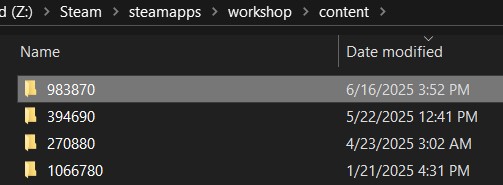
- On your computer, navigate to:
Steam\steamapps\workshop\content\983870\
The
983870folder is specific to Foundry.
Mods are often found under this path:
C:\Program Files (x86)\Steam\steamapps\
…but may be located on a different drive. Refer to the image below if you’re unsure:
3. Zip the Workshop Mods
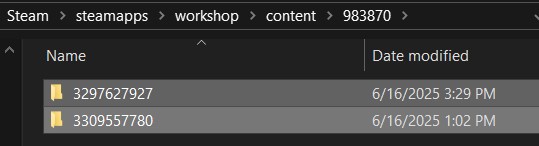
Section titled “3. Zip the Workshop Mods”- Inside the
983870folder, select the mods you want. - Right-click and choose:
Send to → Compressed (zipped) folder
✅ You can zip one or multiple mods. The EVLBOX Mod Loader handles both formats.
4. Upload to the mods-upload Folder
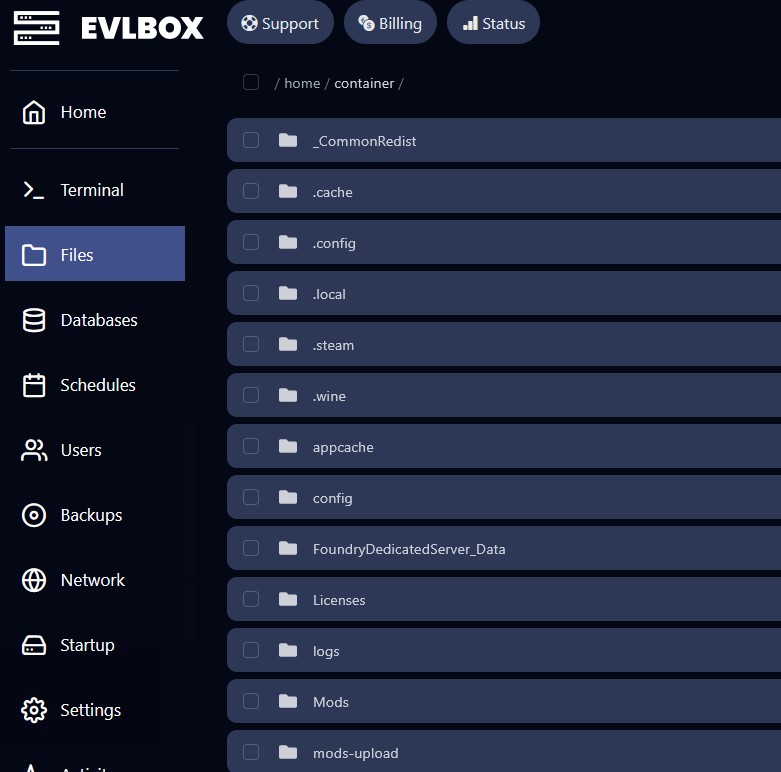
Section titled “4. Upload to the mods-upload Folder”- Log in to the EVLBOX Nitro Panel.
- Go to Files for your server.
- Open the
mods-uploadfolder (not theModsfolder).
5. Drag and Drop Your Zip Files
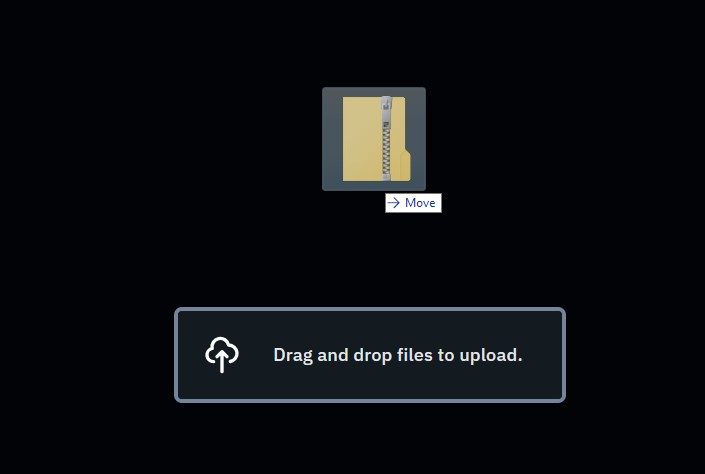
Section titled “5. Drag and Drop Your Zip Files”- Drop your zipped mod files into
mods-upload. - Do not extract them!
6. Restart Your Server via Terminal
Section titled “6. Restart Your Server via Terminal”- In the Nitro Panel, click Terminal from the left navigation.
- Click Restart.
The console will launch the EVLBOX Foundry Mod Loader, showing installed mods.
⚠️ Sometimes multi-mod zips show duplicate mods. This is normal and won’t cause issues.
Important Notes About Mod Compatibility
Section titled “Important Notes About Mod Compatibility”No Automatic Syncing
Section titled “No Automatic Syncing”Foundry does not support auto-syncing mods with players. Everyone who joins your server must have the exact same mods installed.
We strongly recommend using a Steam Workshop Collection to make this easy.
👉 How to Create a Steam Collection for Mod Syncing
Most Mods Require the “Unfoundry” Mod
Section titled “Most Mods Require the “Unfoundry” Mod”To work correctly, most server mods need Unfoundry:
👉 Unfoundry on Steam Workshop
Not All Mods Are Supported
Section titled “Not All Mods Are Supported”Some mods are not compatible with servers and may be auto-deleted during loading.
How to Remove Mods
Section titled “How to Remove Mods”- Stop your server.
- Go to the
/Modsfolder. - Check the mod folders you want to remove.
- Use the trash icon or right-click → Delete.
Also clear the matching zip files from mods-upload to prevent reloading.
Early Access Warning
Section titled “Early Access Warning”Mods for Foundry are still in early access. They may be buggy or unstable.
Need Help Connecting?
Section titled “Need Help Connecting?”See our companion guide:
👉 How to Connect to a Foundry Server
Ready to mod your world? Upload your favorites and enjoy a customized Foundry experience with EVLBOX!