🔥 ENSHROUDED 1.0 IS HERE: servers rebuilt for 1.0, every setting in the panel, and a year of any game on the new Flex plan.
Minecraft Server Calculator: Figure Out Exactly What You Need
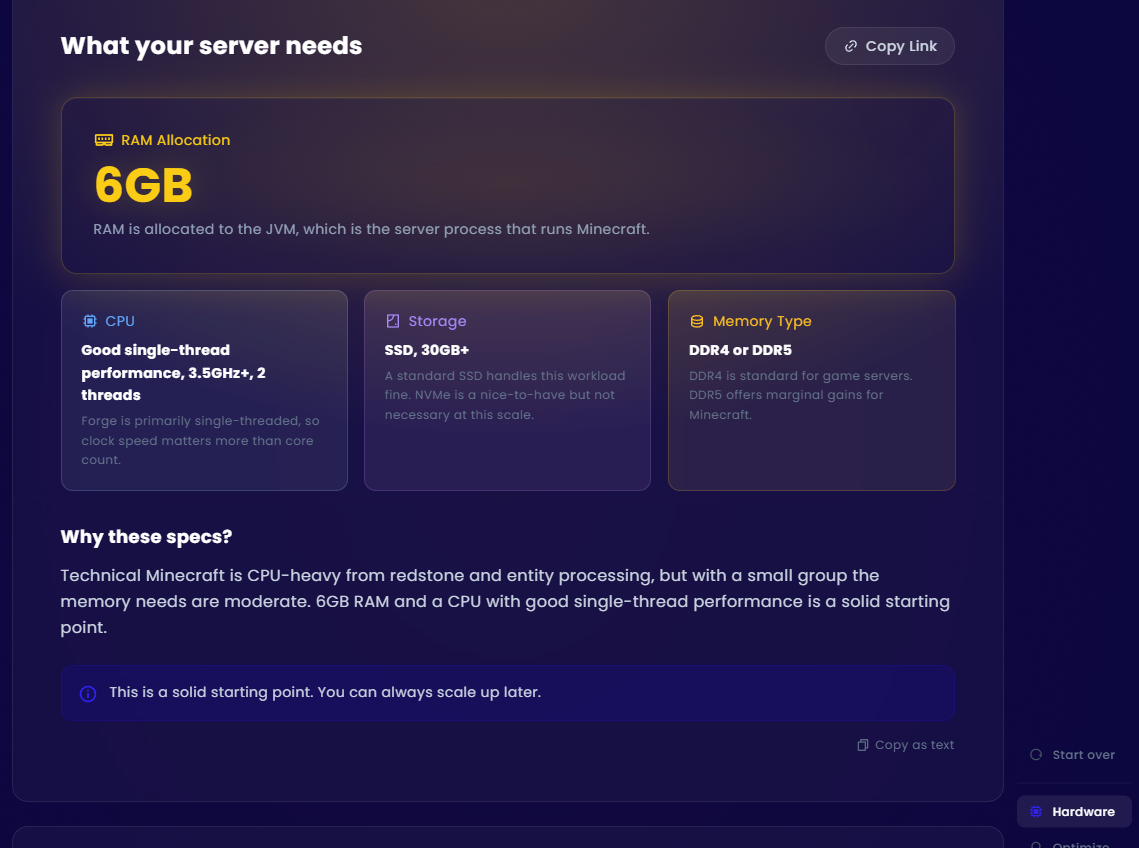
Short answer: there's no single spec list that works for every Minecraft server. A vanilla survival server for 5 friends needs completely different hardware than a 40-player Forge kitchen sink pack. That's why we built a free Minecraft server calculator that asks about your actual setup — software, mods, player count, version — and gives you real recommendations across RAM, CPU, storage, and network.
No signup. No email gate. Just answers.
Why Most Minecraft Server Calculators Are Useless
Here's what almost every "Minecraft server requirements calculator" on the internet looks like: pick your player count, get a RAM number, and — surprise — the recommended plan happens to be from the company that built the calculator.
That's not a tool. That's a sales funnel with a slider.
The problem is that RAM is only one piece of the puzzle. A 1.7.10 Forge pack is single-threaded and clock-speed hungry. A modern Paper server with 20 plugins handles concurrency differently than vanilla. A self-hosted box behind residential internet has bandwidth constraints that a datacenter hosted VPS doesn't. None of that shows up when the only output is "you need 8GB of RAM, here's our 8GB plan."
We built our Minecraft server specs calculator because we genuinely wanted something better to point people to. If you end up buying a plan from us, great. If you use the results to spec out a home server or pick a different host entirely, we're good with that too. We'd rather you have the right information than buy the wrong plan — even if that plan isn't from us.
What the Calculator Actually Covers
Our Minecraft server resource calculator walks you through a few quick questions:
- Where are you hosting? — Game server provider, self-hosted at home, VPS, or not sure yet
- Server software — Vanilla, Paper/Purpur, Forge, Fabric, or NeoForge
- Minecraft version — Legacy (1.7.10/1.12.2), moderate (1.16–1.18), or modern (1.19+)
- Mod/plugin load — Minimal, moderate, or heavy/kitchen sink
- Playstyle — Survival, creative, minigames, technical (redstone farms), or modded questing
- Player count — From a small friend group up to 50+
- Extras — Web maps (Dynmap/BlueMap), auto backups, proxy setup, world pre-gen
Based on your answers, you get specific recommendations for:
- RAM — How much to allocate to the JVM (not just "total RAM")
- CPU — Clock speed and thread count, with specific chip suggestions for home hosting
- Storage — Disk size and type (SSD vs NVMe matters more than people think)
- Network — Upload bandwidth requirements if you're hosting from home
Each recommendation comes with an explanation of why those specs make sense for your specific setup, plus optimization tips like Aikar's JVM flags or view-distance tuning.
Minecraft Server Hardware Requirements: The Nuances
Most guides give you a table like "10 players = 4GB RAM" and call it a day. The reality is way more variable than that. Here's what actually moves the needle:
Server Software Matters More Than Player Count
A Paper server with 20 players and optimized configs can run comfortably on specs that would choke a Forge server with 10 players running 150+ mods. Paper's async chunk loading and entity optimizations mean it squeezes more out of the same hardware. Forge and NeoForge modpacks, especially kitchen-sink packs, are RAM-hungry and CPU-hungry in ways that scale with mod count, not just player count.
Version Matters
Legacy Minecraft (1.7.10, 1.12.2) is effectively single-threaded. That means clock speed is king — a 5 GHz dual-core will outperform a 3 GHz 8-core for those versions. Modern versions (1.19+) have gotten better at utilizing multiple threads, but single-thread performance still matters a lot.
Self-Hosting Has Hidden Requirements
If you're looking at self-hosted Minecraft server requirements, RAM and CPU are only half the story. Your home internet connection is the bottleneck most people don't think about. Five friends on a 10 Mbps upload? Probably fine. Thirty players? You need 15–20+ Mbps upload minimum, and that's before accounting for anyone else in your household using bandwidth.
You also need to deal with port forwarding, running the server as a service so it survives reboots, and ideally being on ethernet instead of WiFi. Our calculator covers all of this when you select the home hosting option — including a bandwidth requirements table and a checklist of things most guides skip.
A lot of hosting companies will tell you how awful it is to run a Minecraft server at home. There definitely are some things you should consider (security, performance etc.), they often look past the cost aspect. It's not always in the budget to go out and buy a premium hosted Minecraft server. Not every situation requires it. Just want a place for you and the boys to play on occasion? Provided you aren't reckless with your home-internet security, and you didn't meet "the boys" on a strange discord server a few hours ago you realistically don't have many concerns and can save yourself some cash. Just maybe don't try to host a multi-network setup out of your garage for 1000+ players.
What Happens When You Under-Spec
This is where we'd rather be honest than make a sale. An under-specced Minecraft server doesn't just "run slow." You get TPS drops below 20 (the game literally slows down), chunk loading stutters, rubber-banding during combat, and eventually crashes during peak hours. Players leave. You end up upgrading anyway, except now you've also lost the community momentum you were building.
It's cheaper — in every sense — to get it right the first time. That's the whole point of the calculator.
Home vs VPS vs Managed Hosting
One of the things that makes our calculator different is that it gives context-aware advice based on how you're hosting, not just what you're running.
Self-hosting at home is great for small groups. It's free (minus electricity), you have full control, and latency to local players is excellent. But it falls apart past ~15 players unless you have serious upload bandwidth, and your server goes down when your power or internet does.
A VPS gives you datacenter network and uptime without the management overhead of running bare metal. You handle the Minecraft installation and config yourself, but you're not worrying about port forwarding or residential ISP throttling. Our calculator maps recommendations to specific EVLBOX VPS plans when you select this option.
A managed game host (like us) handles the infrastructure entirely. You pick your plan, click install, and you're running. Our Nitro Panel handles updates, backups, and mod installation through a browser UI. The calculator maps your specs to specific Minecraft hosting plans with pricing.
How Much RAM Does a Minecraft Server Need?
Since this is the question everyone Googles: it depends, but here are rough ranges.
- Vanilla, 1–5 players: 3–4 GB
- Paper/Purpur, 10–15 players with plugins: 5–6 GB
- Forge/Fabric, moderate modpack, 5–10 players: 6–8 GB
- Heavy modpack (kitchen sink), 10–20 players: 10–12 GB
- Large community, 30+ players with plugins/mods: 12–16 GB+
But again — these are ballpark numbers that ignore CPU, storage, version, and network. The calculator gives you the full picture in about 30 seconds.
Try It Yourself
We built this Minecraft server calculator as a community tool, not a lead gen form. No signup, no email capture, no "contact sales for a quote." Just pick your options, get your specs, and share the results link with whoever's helping you set things up.
Open the Minecraft Server Calculator →
And if you do end up wanting hosting — we run our own AMD Ryzen and EPYC hardware with NVMe storage out of Dallas, Los Angeles, New York and Falkenstein, Germany. Small team, real infrastructure, no overselling. Check out our Minecraft server hosting or VPS plans if that sounds like your thing.
- Authors