 🔥 ENSHROUDED 1.0 IS HERE: servers rebuilt for 1.0, every setting in the panel, and a year of any game on the new Flex plan.

Satisfactory Server Hosting
Satisfactory is one of the most resource-intensive factory games out there, and your server needs to keep up. EVLBOX Satisfactory server hosting gives you dedicated Ryzen CPU cores, NVMe storage, and automatic backups so you can focus on building, not babysitting infrastructure. Invite your friends and build the mega factory you've been planning.
Why Host Satisfactory with EVLBOX?
Rated 4.6/5 on Trustpilot. Here's why Satisfactory players trust us with their factories.
Instant Setup
Your Satisfactory dedicated server is provisioned automatically. Order, log in, and start building. No manual installs, no command-line setup.
Low-Latency Network
Satisfactory is bandwidth-heavy. Our servers sit on premium network routes with DDoS protection at every location, keeping your factory simulation smooth even at scale.
Save Transfers
Upload your single-player save and keep building with friends, or download your server save to continue offline. Full save portability through the Nitro panel.
7-Day Money Back
Not satisfied? Every Satisfactory hosting plan comes with a 7-day money-back guarantee. No questions, no friction. We want you to be happy with your server.
Plans from $16/mo
Standard
- Perfect for most factory builders – smooth gameplay, reliable performance, and no player slot limits
- 10GB DDR4 Memory for stable multi-hour sessions
- 20GB NVMe storage for fast save/load times
- 2 Ryzen CPU cores optimized for Satisfactory
- 4 worldwide server locations to reduce lag
- Automatic backups every 2 hours
- SteamCMD updates on reboot
- Built-in task scheduler for automation
*$2 surcharge for Los Angeles
Ultra
- The ultimate Satisfactory experience – for factory perfectionists and large-scale automation projects
- Hosted exclusively in our Dallas location on EVLBOX-owned infrastructure
- DDR5 Memory paired with Ryzen 9 7950X CPU
- Customizable 30–75 tick rate (90 possible for smaller servers)
- Ultra-responsive gameplay with minimal latency
- Underloaded hardware for consistent top speeds
- Built-in task scheduler for full control
Satisfactory Server Requirements
How much RAM and CPU does a Satisfactory dedicated server actually need? Here's what we recommend.
RAM by Player Count
1–4 players: 10GB RAM is comfortable for early and mid-game factories. This covers most groups.
4–8 players: 10GB still works, but if your factory is reaching late-game complexity, consider upgrading.
8+ players: 12GB with our Ultra plan. Large multiplayer factories with hundreds of machines need the extra headroom.
CPU Performance
Satisfactory is CPU-intensive. Every conveyor belt, smelter, and vehicle route is simulated server-side, and that load grows as your factory scales. Our Standard plan includes 2 dedicated Ryzen cores. The Ultra plan runs on a Ryzen 9 7950X with DDR5 memory on EVLBOX-owned hardware in Dallas, with customizable tick rates up to 90.
Disk Space
Satisfactory save files grow as your factory expands. Late-game saves can reach several hundred MB. All plans include NVMe SSD storage for fast load times. The Standard plan comes with 20GB, which is plenty for even large factories and multiple saves.
Running Satisfactory on Linux and Docker
If you were going to containerise it yourself, here is what we already do.
Your server is already a containerised Linux server
Coffee Stain ships a native Linux build of the dedicated server (Steam app 1690800), and that is what we run. The Nitro Panel is built on Pterodactyl, so every server gets its own Docker container with its own CPU and memory limits. Your factory's tick budget is yours. Nothing else on the node can eat it.
If you would rather self-host with Docker
There is no official image from Coffee Stain, so the usual route is a community one such as wolveix/satisfactory-server. They work, and if you enjoy running your own infrastructure you should. What you are buying from us is not the container. It is not having to babysit it: the SteamCMD update after every patch, the port mapping, the volume that fills up, the 3am restart when a save balloons.
Panel access, not shell access
To be straight about the tradeoff: you get the panel, a live console, and full SFTP into the server files. You do not get a Docker socket or a root shell on the node, because that is what keeps the container next to yours from becoming your problem. Everything Satisfactory itself needs, including branch switching and mods, is reachable without one.
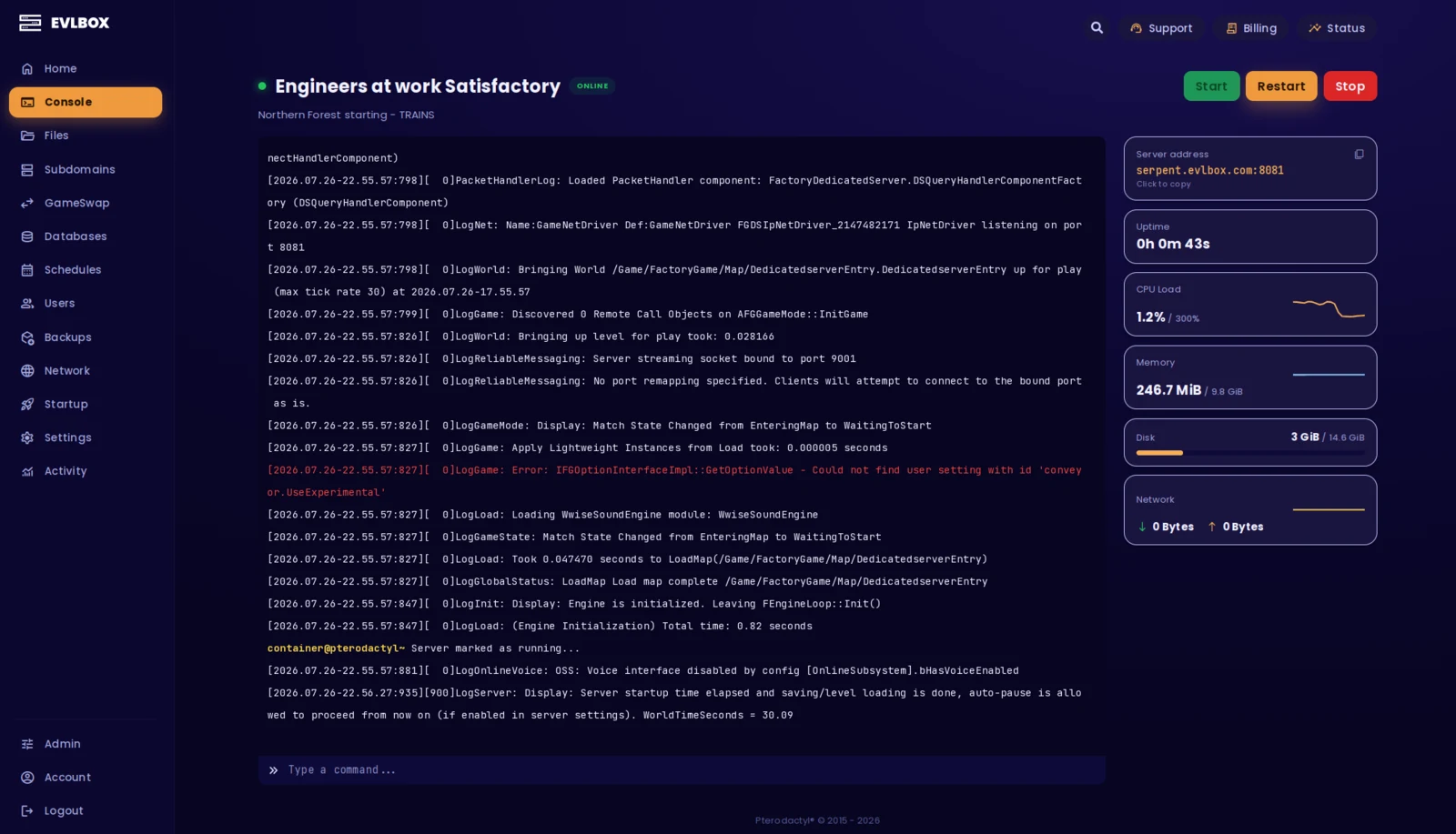
The Nitro Panel
Based on Pterodactyl.io, our control panel is packed with features and style, helping you control your server with ease and precision.
Satisfactory Server Features
Everything included with your Satisfactory dedicated server hosting plan.
Mod Support
Full support for the Satisfactory Mod Manager (ficsit.app) via SFTP. Our admin team plays Satisfactory and is always happy to help with mod setup or recommendations.
Save Management
Upload and download save files directly from the Nitro panel. Transfer single-player worlds to your server or pull saves down to continue offline.
Automatic Backups
12 backup slots with automatic snapshots every 2 hours while your server is running. Backups are stored off-site so your factory is protected even against hardware failures.
Experimental Branch
Day-one experimental branch support. Switch between stable and experimental from the Nitro panel. The latest 1.2 experimental update brings a vehicle paths rework, improved weather system, and more. Play new content the moment Coffee Stain drops it.
Server Updates
Satisfactory updates are applied automatically via SteamCMD on server reboot. No manual patching. Your server stays current with minimal downtime.
Multiplayer Sessions
No hard player cap. Your server scales with your group. Manage who can join through Satisfactory's built-in session management and server passwords.
Four Locations
We have three locations throughout the United states, and one based in Falkenstein, Germany. Check your ping against our locations to decide on which is best for your server.

Your factory isn't going anywhere
Satisfactory groups play hard through an update, finish what they set out to build, and then wait for the next one. That's a normal way to play the game. It's just an awkward thing to keep paying for, and the only alternative most hosts offer is losing the save.
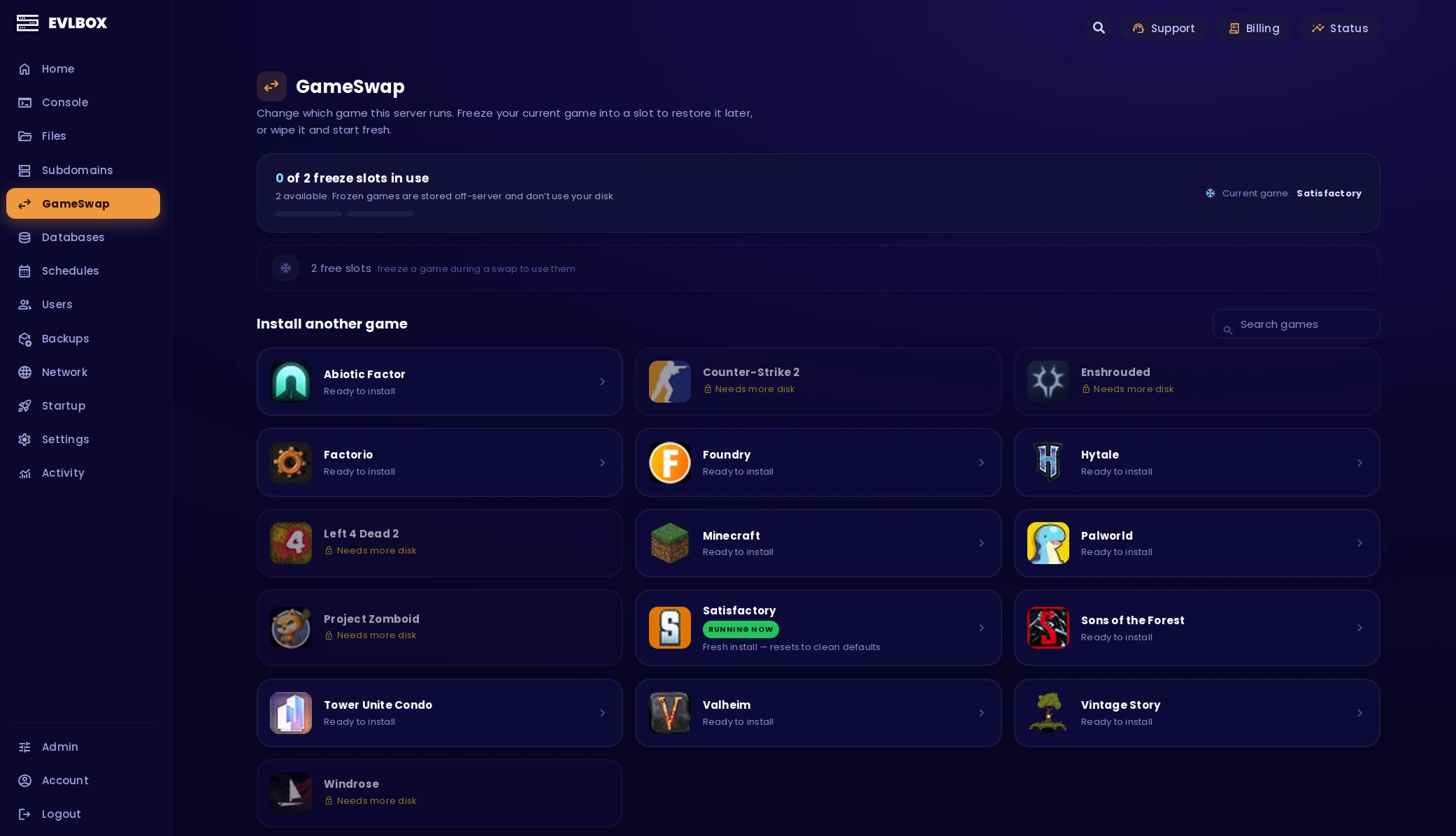
GameSwap is the third answer. Freeze the whole server, save and mods and config included, and we archive it off the box while something else runs there. When the next update lands, hit restore and your factory is exactly where you left it. Every belt, every train, every splitter you spent a weekend aligning.
It's included on every server we run. No new order, no second bill, and one freeze slot free.
About Satisfactory
New to the game? Here's what you need to know.
Satisfactory is a first-person open-world factory building game developed by Coffee Stain Studios. You're dropped onto an alien planet and tasked with building increasingly complex production lines, from simple iron smelters to sprawling multi-level mega factories with conveyor belts, trains, drones, and vehicle automation. It's one of the most ambitious building games available, with a massive world to explore and automate.
While Satisfactory supports peer-to-peer multiplayer where one player hosts the session, this ties the server to that player's PC and internet connection. When they go offline, everyone goes offline. A Satisfactory dedicated server solves this. Your factory runs 24/7 regardless of who's online, with better performance and lower latency for all players. For groups who want to build together on their own schedule, a dedicated server is the way to go.
Satisfactory servers are more resource-intensive than most game servers due to the simulation complexity. Every machine, conveyor, and vehicle on the map is calculated server-side, which is why choosing a host with strong hardware matters. EVLBOX runs Satisfactory on dedicated Ryzen CPUs with NVMe storage and low-latency networking across 4 locations to keep your factory running at full speed.
Need Help Getting Started?
Check out our guides and resources for Satisfactory
All Satisfactory Guides
Browse all Satisfactory server docs, settings references, and tips.
View All Docs →Getting started is easy
Select a Plan
Choose the right plan for your gaming session. This may be based on the number of players joining your server or the amount of resources the game and you will need.
Choose a Location
Depending on where you and your friends are playing from, select a location that is best for you. You can easily check your ping before buying to see the ping time of the connection from your location.
Select a billing Cycle
Choose to pay monthly, or receive a discount on quarterly, semi-annual, or yearly payment plans
Review the Specs
Review the options for Port, Memory and CPU Cores and select different options to customize the server for your gaming experience. Lots of friends joining you? You may want to increase the RAM accordingly.
Pick a Name and Complete your transaction
Name your server so your friends can find and connect to your game easily. Complete your purchase and you will receive an email within minutes with links to your server and Nitro Panel
Customize on the fly
Need to add another Gig of RAM, or add an extra CPU core? You can add/remove resources to your server at any time through our Billing Portal. No server restart needed!
Rated 4.6/5 on Trustpilot
Questions?
How do I set up a Satisfactory dedicated server?
Setting up a Satisfactory dedicated server with EVLBOX takes under five minutes. After ordering your plan, your server is provisioned instantly. Log into the Nitro control panel, start your server, and connect through Satisfactory's in-game Server Manager using the IP address provided. Your server comes pre-installed and ready to play, no command-line setup needed.
How much RAM does a Satisfactory server need?
For groups of 1 to 4 players with small to medium factories, 10GB of RAM is plenty. That's our Standard plan. Larger groups of 8+ players or late-game mega factories with hundreds of machines benefit from our 12GB Ultra plan, which includes a Ryzen 9 7950X CPU and DDR5 memory for the heavier simulation load. You can upgrade your RAM at any time through the Nitro panel without losing your save data.
Can I transfer my single-player Satisfactory save to a server?
Yes, Satisfactory save files are fully interchangeable between single-player and dedicated servers. Upload your local save through the Nitro panel's file manager to the save directory, and your entire factory transfers over. You can also download server saves to continue building offline.
Does EVLBOX support the Satisfactory experimental branch?
Yes. You can switch between Satisfactory's stable and experimental branches directly from the Nitro control panel. Branch switching is handled through SteamCMD and typically takes just a couple of minutes. We recommend backing up your save before switching branches, as experimental saves are not always backwards-compatible with the stable release.
Can I install mods on my Satisfactory server?
Yes! We fully support the Satisfactory Mod Manager (ficsit.app) via SFTP. Our admin team actively plays Satisfactory and is always happy to help with mod setup or recommendations. All players connecting will need the same mods installed locally.
How many players can a Satisfactory server support?
Satisfactory dedicated servers don't enforce a hard player cap. Performance depends on your hardware and factory complexity. Our Standard plan handles 4 to 6 players comfortably with mid-size factories. The Ultra plan with its Ryzen 9 7950X CPU and DDR5 RAM supports 8+ concurrent players even in late-game scenarios with massive production lines. Both plans include unrestricted player slots.
What locations are available for Satisfactory server hosting?
EVLBOX offers Satisfactory servers in four locations: Dallas (TX), Los Angeles (CA), New York (NY), and Falkenstein (Germany). Our Ultra plan is hosted exclusively in Dallas on EVLBOX-owned hardware for the best possible performance. Since Satisfactory is bandwidth-intensive, choosing a server location closest to your group is important for minimizing latency and keeping gameplay smooth.
Where can I host a Satisfactory server for free?
There is no free option that holds up for Satisfactory specifically. You can run the dedicated server on your own PC at no cost, but the simulation is heavy and it wants the RAM and CPU that machine is already using to play the game. Free trial tiers from hosts are normally time-limited and memory-capped, and a Satisfactory save outgrows a small cap fast. If budget is the constraint, the honest advice is to start on the Standard plan and only upgrade once your factory actually needs it.
Can I host my own Satisfactory dedicated server?
It is possible to self-host a Satisfactory dedicated server, and the Official Wiki covers the setup process. Keep in mind that Satisfactory servers are resource-hungry. They need significant RAM, CPU, and consistent bandwidth, especially as your factory grows. Running one on a home connection also exposes your network IP. For reliable uptime, DDoS protection, automatic backups, and consistent low-latency performance, a dedicated host is the simpler choice.