 🔥 ENSHROUDED 1.0 IS HERE: servers rebuilt for 1.0, every setting in the panel, and a year of any game on the new Flex plan.
 Host
HostPalworld Server Hosting
Your Pals deserve a home that never sleeps — with full crossplay, friends on PC, Xbox, PS5, and Mac can all play on the same server. Fast Ryzen cores, NVMe drives, and save backups every 2 hours. Grab your friends and catch some Pals!
One plan, fully configurable
6GB RAM
1-8 players*$2 surcharge for Los Angeles
Every server includes one GameSwap freeze slot. Pay yearly and we add two more, so you can keep three game servers frozen in time and swap between them.
7-day money-back guarantee · 4.6★ on Trustpilot
Palworld 1.0 is here — and we're built for everything after
We keep our Palworld servers current with every update, so your world is ready the moment a new patch drops. Here's what's already built in:
Full console crossplay
PC (Steam & Game Pass), Xbox, PS5, and Mac — everyone on the same server. Consoles can't type in an IP address, so we added a one-click Community Server toggle that lists your server in Palworld's in-game browser where console friends can find and join it.
Your server stays unlisted and private by default, and a crossplay dropdown lets you control exactly who can join: everyone, PC-only, console-only, or a single platform.
Every setting, no config files
All 90+ Palworld world settings — XP rates, capture rates, day/night speed, raids, guild limits, hardcore mode, the works — are editable right from the Nitro Panel.
Settings are organized into sensible groups with dropdowns and toggles instead of type-it-yourself text, and they apply automatically every time your server starts. New to it? Our Palworld server settings guide explains every option, with presets.
Server Care, safe progress
Palworld only reliably saves on a clean shutdown — so stopping or restarting from the panel gives the server a 15-second warning, saves the world properly, then exits. No lost progress. On top of that, we back up your saves every 2 hours, automatically — whatever you and your Pals get up to at the Breeding Farm stays safe with us.
And if anything ever goes sideways, a real person actually helps you sort it out — mods, configs, the little things — never an upsell. That personal touch is why folks make their home with EVLBOX and stay.
Day-one updates, every time
Our servers are running Palworld 1.0 right now. When Palworld updates, your server gets the new version fast — no waiting around while your friends play without you.
Guides for console crossplay and a full settings reference live in our docs.
Not just a server we run, a home we've begun
Yes, we support mods
Most hosts will tell you Palworld servers can't run mods. Ours can. Flip your server to our modded configuration from a dropdown in the panel, keep your world, and the mod loader is already switched on waiting for you.
Same performance, same saves, no extra charge, and you can flip back to vanilla just as easily. Upload your mods through the file manager and go.
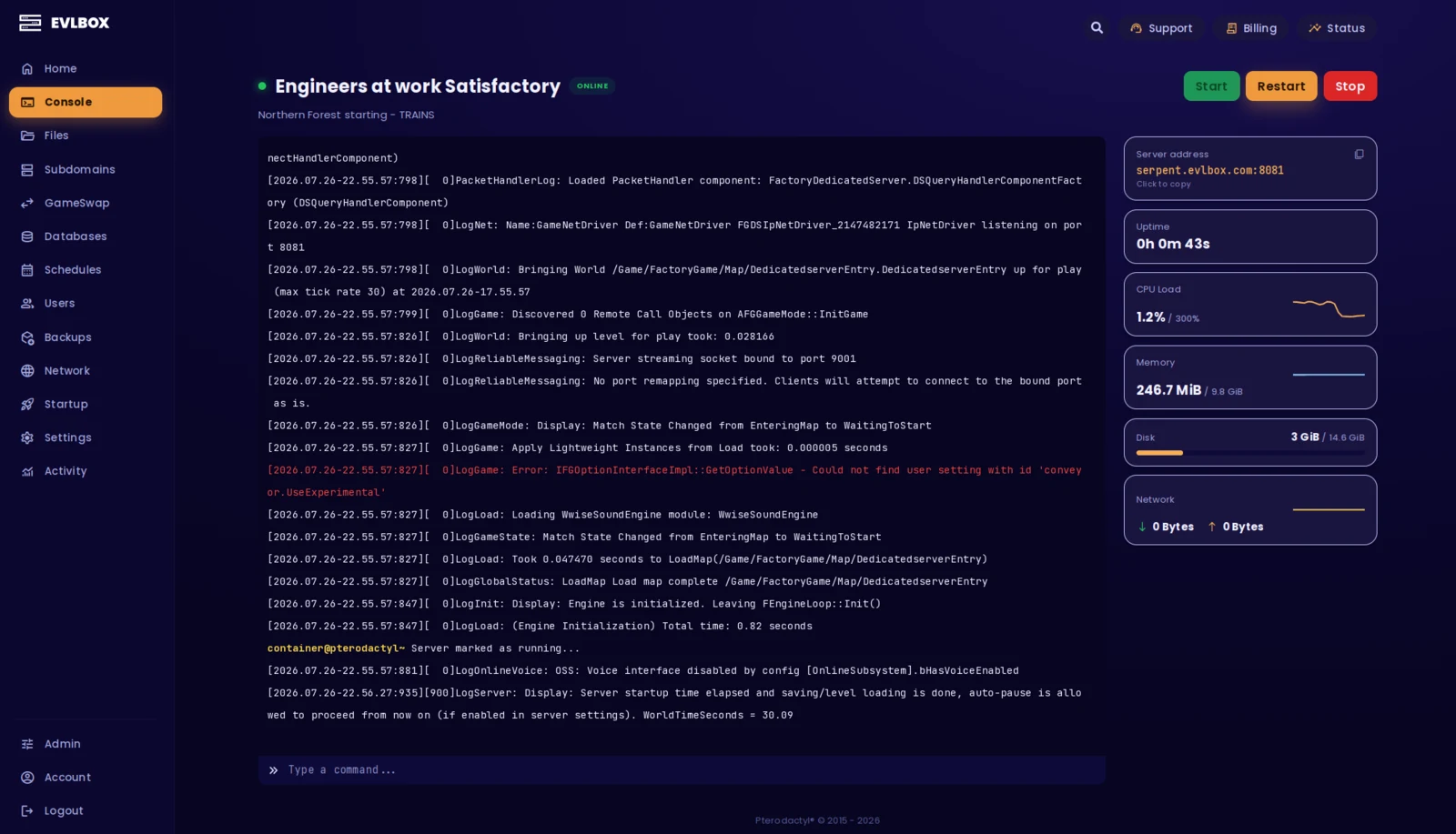
The Nitro Panel
Based on Pterodactyl.io, our control panel is packed with features and style, helping you control your server with ease and precision.
Four Locations
We have three locations throughout the United states, and one based in Falkenstein, Germany. Check your ping against our locations to decide on which is best for your server.

Getting started is easy
Select a Plan
Choose the right plan for your gaming session. This may be based on the number of players joining your server or the amount of resources the game and you will need.
Choose a Location
Depending on where you and your friends are playing from, select a location that is best for you. You can easily check your ping before buying to see the ping time of the connection from your location.
Select a billing Cycle
Choose to pay monthly, or receive a discount on quarterly, semi-annual, or yearly payment plans
Review the Specs
Review the options for Port, Memory and CPU Cores and select different options to customize the server for your gaming experience. Lots of friends joining you? You may want to increase the RAM accordingly.
Pick a Name and Complete your transaction
Name your server so your friends can find and connect to your game easily. Complete your purchase and you will receive an email within minutes with links to your server and Nitro Panel
Customize on the fly
Need to add another Gig of RAM, or add an extra CPU core? You can add/remove resources to your server at any time through our Billing Portal. No server restart needed!
Rated 4.6/5 on Trustpilot
Questions?
I'm new to Palworld hosting. Is this easy to set up?
Getting started with Palworld is a breeze for newcomers. Just copy your Palworld's connection address into the Multiplayer Join connection bar and you will join your server. Our support team is readily available to assist with any queries you may have.
Can I play if I have the Game Pass version?
Yes. Game Pass and Microsoft Store players can join the same server as everyone else with crossplay enabled. Our docs walk through the setup step by step.
Can I install mods on my Palworld server?
Yes. Most Palworld hosts can't do this, so it's worth saying plainly: we run a second server configuration built for mods, and switching to it is a dropdown in the panel. Your world comes with you, the mod loader is already on, and there's no extra charge or bigger plan involved. Upload your mods through the file manager and restart. Flipping back to vanilla is just as quick. Mods are third-party software, so a broken one isn't something we can fix for you, but ask us and we'll help you work out what went wrong.
How do backups work, and how many do I get?
Every Palworld server comes with 12 backup slots and a backup job that runs every 2 hours, set up automatically when your server deploys, so there's nothing for you to configure. Twelve slots on a two-hour schedule gives you a rolling day of restore points, and you can change the schedule or restore any of them yourself from the Nitro Panel. Backups only run while the server is running, so a stopped server isn't being backed up. They're stored off-site rather than on your server, so losing the machine doesn't mean losing your world.
What is your refund policy?
Our game servers have a 7 day refund policy. If you're not happy with the service you can cancel within the first 7 days and get a full refund. Refunds aren't automatic, so open a ticket with us, either in our Discord or through the client portal, and a person will sort it out. You need to request it within the first month of service. Services that have been in use for a month or have already renewed aren't eligible.
How much RAM do I need for my server?
We suggest 6-10GB for groups of six or less, 10-14GB for groups of around ten, and 16GB once you're past fifteen. Palworld's memory use also grows with how much your group has built and how many Pals are in the world, so a long-running server wants more headroom than a fresh one. Your plan is configurable from 6GB to 16GB and you can move up or down at any time without starting over.
Can I host my own Palworld server?
It is possible to host your own Palworld server, and the official documentation has everything you need to get started. Hosting on your home network isn't advised, because it exposes your home IP and the world is only online while that machine is. For the best experience we recommend a professional game server host.