🔥 ENSHROUDED 1.0 IS HERE: servers rebuilt for 1.0, every setting in the panel, and a year of any game on the new Flex plan.
Palworld Server Settings: Every Option Explained (1.0 Guide)
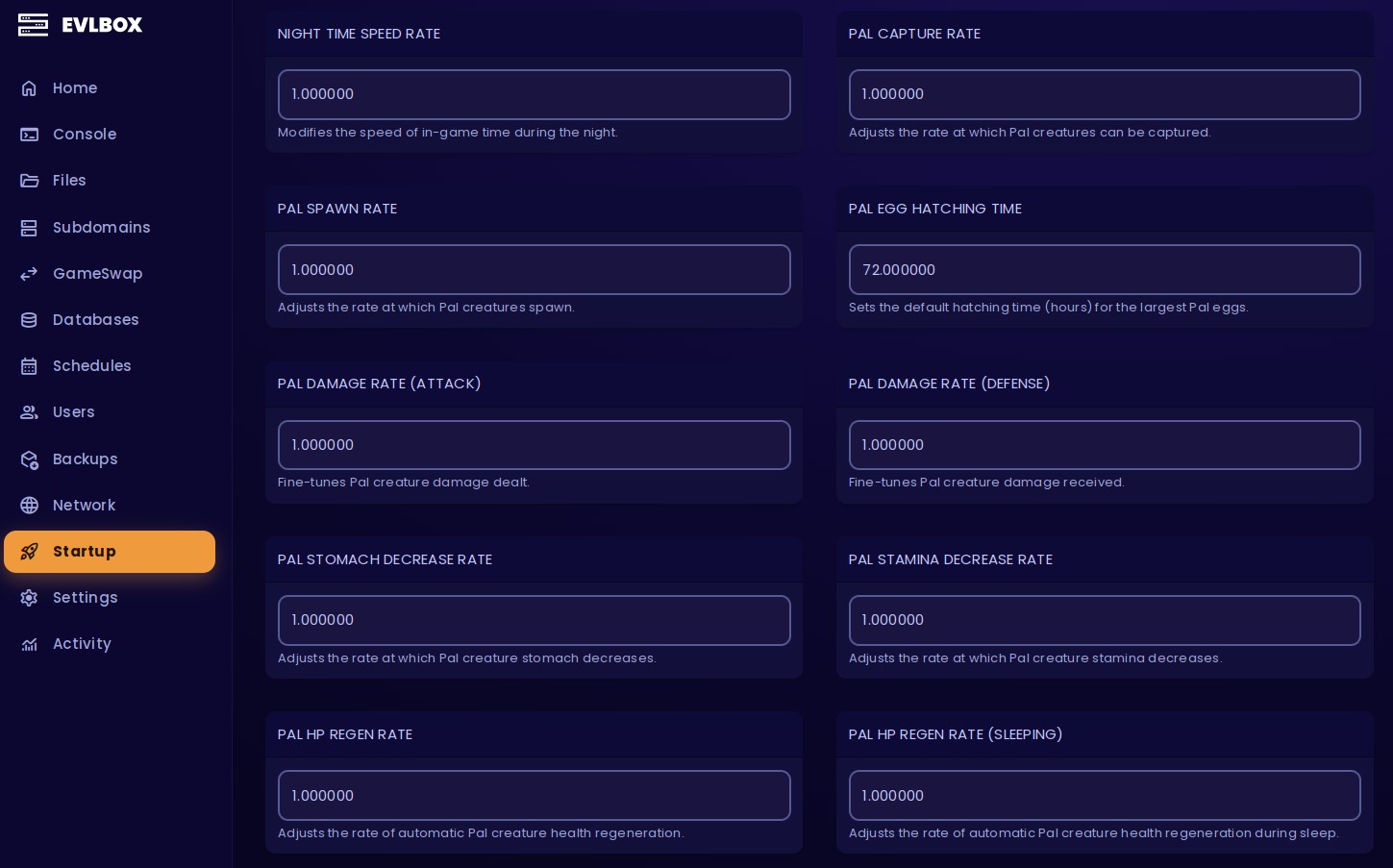
Palworld server settings live in a file called PalWorldSettings.ini. On a self-hosted server you edit that file by hand; on a server hosted with us you set every option as a labelled field in the panel — no file editing, no praying you didn't fat-finger a decimal. This guide covers all 89 of them: what each one does, what the default actually is, and the four presets most groups end up wanting anyway.
One thing up front, because it's the whole reason this guide exists: it's written for Palworld 1.0, and it flags what changed. Most settings guides you'll find were written back in January 2024, and the game has moved on — new options exist, a couple of old assumptions are now wrong, and 1.0 has a save-file gotcha that silently ignores half your edits if you don't know about it. We run Palworld server hosting for a living, so what follows is written from what actually happens when you flip these switches, not from a two-year-old patch.
Just here for the full list? Jump straight to every setting with its default at the bottom.
Where are Palworld server settings?
Three places, depending on how you're playing:
1. Self-hosted / SteamCMD. If you're handling the Palworld dedicated server set up yourself, the file is PalWorldSettings.ini, and it lives at:
- Windows:
steamapps\common\PalServer\Pal\Saved\Config\WindowsServer\PalWorldSettings.ini - Linux:
steamapps/common/PalServer/Pal/Saved/Config/LinuxServer/PalWorldSettings.ini
Two catches that trip everyone up. First, editing DefaultPalWorldSettings.ini does nothing — you have to copy its contents into the file above and edit that one. Second, and this is the 1.0 gotcha: once your world has been generated, the server stores most world settings in WorldOption.sav and stops reading them from the ini. Server name, ports and player caps still come from the ini, but rates, death penalty, building rules and the rest are now baked into the save. Change a value in the ini, restart, and nothing happens — because the server is reading the .sav. This is the number-one reason people swear their palworld server settings file "doesn't work." You either edit WorldOption.sav with a tool or start a fresh world.
2. Non-dedicated co-op world. If you're hosting from inside the game rather than running a dedicated server, settings are chosen at world creation and stored with the save, not in a PalWorldSettings.ini at all.
3. Hosted with us. Every setting is a labelled field in the Nitro panel's Startup tab. You change it, restart, done — and because we manage the save layer, you don't have to think about the WorldOption.sav trap at all.
The settings that actually matter
Palworld has 89 settings. You'll change maybe eight of them. These are the ones every server owner touches or gets burned by.
Admin password. Palworld gates all admin commands behind an admin password. Whatever placeholder your host or install ships with, change it to something unique before you invite anyone — anyone who has it can kick, ban, teleport and shut your server down. This is the one setting where the default is genuinely dangerous, because default admin passwords are the first thing people try on a server they find in the browser.
Community Server (PUBLIC_LOBBY) — default off. This is the single biggest crossplay gotcha in the game. PS5 and Xbox players cannot join by IP — consoles have no box to type an address into. They can only see servers listed in Palworld's in-game community browser, and this toggle is what puts you there. Leave it off and it's PC-only by IP; flip it on and console friends can find you. (Here's how console crossplay works in full.)
Crossplay Platforms — default Steam+Xbox+PS5+Mac (everyone). Narrow it to Steam+Mac for PC-only, Xbox+PS5 for console-only, or a single platform. Pair it with a password and a listed server stays friends-only.
Pal Egg Hatching Time — default 72. That's 72 real-world hours for the biggest eggs, and it's the most-changed number in the game. Most groups set it to 1 or 2; set it to 0 for instant hatching. Nobody who plays a few hours a week is waiting three real days for a Legendary.
Death Penalty — default All (you drop items and equipment on death). The other options are None, Item, and ItemAndEquipment. All is punishing for a casual group; Item is the sensible middle ground. This is a top palworld server settings death penalty search for a reason — it's the first thing new groups soften.
Build Object Deterioration Rate — default 1.0. Set it to 0 to disable structure decay entirely. If your group plays in bursts — a big weekend, then quiet all week — nothing kills the mood faster than logging in to find your base rotting. Set it to 0. Everyone does.
Max Players — default 32, hard-capped by the game at 1–32. You can't go higher no matter what a guide tells you.
Use Backup Save Data + Auto Save Interval — defaults True / 30 seconds. Leave backups on. The auto-save interval is in seconds, not minutes — 30 is fine for most worlds, and on our servers we take our own backups every 2 hours on top of it, so a bad session is always recoverable.
Recommended Palworld server settings: four presets
Below are four starting points. Each is given twice — as PalWorldSettings.ini lines for self-hosters, and as panel fields for hosted servers. These only list what changes from default; a preset that repeats 60 unchanged values is useless.
One note on the ini format: your entire Palworld server config lives on a single OptionSettings=(...) line, comma-separated. When you see the blocks below, you're inserting those key=value pairs into that one line — you're not adding new lines to the file.
Chill / Casual
Boosted rates, no decay, near-instant eggs, no death penalty. For a group that wants to build cool stuff and catch Pals without the grind.
ExpRate=3.000000
WorkSpeedRate=2.000000
PalCaptureRate=2.000000
PalEggDefaultHatchingTime=1.000000
DeathPenalty=None
BuildObjectDeteriorationDamageRate=0.000000
ItemWeightRate=0.500000
CollectionDropRate=2.000000
In the panel: EXP Rate 3, Work Speed Rate 2, Pal Capture Rate 2, Pal Egg Hatching Time 1, Death Penalty None, Build Object Deterioration Rate 0, Item Weight Rate 0.5, Collection Drop Rate 2.

The chill preset, visualised. Croajiro has nowhere to be, and on these settings, neither do you.
Balanced
A light quality-of-life lift over vanilla — the "we all have jobs" default. Progress feels good without trivialising the game.
ExpRate=1.500000
WorkSpeedRate=1.500000
PalEggDefaultHatchingTime=2.000000
DeathPenalty=Item
BuildObjectDeteriorationDamageRate=0.000000
In the panel: EXP Rate 1.5, Work Speed Rate 1.5, Pal Egg Hatching Time 2, Death Penalty Item, Build Object Deterioration Rate 0. Everything else stays stock.
Hardcore
Permadeath, permanent Pal loss, harsh penalties, slower everything. For groups who want the game to actually hurt.
bHardcore=True
bPalLost=True
DeathPenalty=All
ExpRate=0.700000
PlayerDamageRateDefense=0.700000
PlayerStaminaDecreaceRate=1.500000
PlayerStomachDecreaceRate=1.500000
bEnableInvaderEnemy=True
In the panel: Hardcore Mode On, Pal Loss On Death On, Death Penalty All, EXP Rate 0.7, Player Damage Rate (Defense) 0.7, Player Stamina Decrease Rate 1.5, Player Stomach Decrease Rate 1.5, Enable Invader Enemies On. (Yes, the stamina and stomach keys really are spelled Decreace — more on that below.)
Big community server (15–32 players)
Performance-first. This one isn't about fun knobs, it's about a busy world staying smooth.
ServerReplicatePawnCullDistance=9000.000000
DropItemMaxNum=1500
DropItemAliveMaxHours=0.500000
BaseCampWorkerMaxNum=10
BaseCampMaxNumInGuild=3
bAutoResetGuildNoOnlinePlayers=True
AutoSaveSpan=60.000000
In the panel: Pawn Cull Distance 9000, Max Dropped Items 1500, Dropped Item Despawn Hours 0.5, Max Base Camp Workers 10, Max Bases Per Guild 3, Auto Reset Inactive Guilds On, Auto Save Interval 60.
How to make your Palworld server run better
Most guides never touch this, which is a shame, because a laggy 20-player world is almost always a settings problem before it's a hardware problem. The real levers:
ServerReplicatePawnCullDistance — default 15000 cm, valid range 5000–15000. This is the single biggest server-side performance lever there is. It's the distance at which the server stops replicating Pals and players to each client. Lower it toward 8000–10000 and a busy world does dramatically less work, because it isn't tracking every Pal across the whole map for every player. The trade-off: things pop in a little closer. On a 32-player server, worth it every time.
DropItemMaxNum — default 3000. Loose items on the ground are simulated, and 3,000 of them across a busy server adds up. Drop it to 1,500 on a large server.
DropItemAliveMaxHours — default 1.0. How long dropped items linger before despawning. Shorter means fewer live items at any moment.
BaseCampWorkerMaxNum — default 15. Every worker Pal at every base is a simulated character. Fewer workers per base is less load, multiplied by every base on the server.
BaseCampMaxNum (128) and MaxBuildingLimitNum (0 = unlimited) — these are how a server slowly gets heavy over months. Unlimited buildings is fine for a small group and a real problem for a big one.
AutoSaveSpan — default 30 seconds. On a large world, saving too often causes a brief hitch each time. Bumping it to 60 on a big server smooths that out.
Palworld server requirements: the honest hardware note
Settings tuning only goes so far. Palworld is RAM-hungry and gets CPU-sensitive on busy worlds, and no amount of config fixes an underpowered box — so it's worth knowing the real Palworld server requirements before you tune a single value. Rough guidance, matching what we actually run: 6–10GB of RAM for six or fewer players, 10–14GB for ten-plus, and 16GB once you're past fifteen, on roughly 2–4 modern CPU cores. RAM is the one that bites first — a server that's fine at launch starts hitching once bases, dropped items and worker Pals pile up, and that's memory pressure, not a settings problem.
Our Palworld dedicated servers run 6–16GB configurable so you can move up a tier when your community grows instead of migrating hosts.
And no, lowering the cull distance won't fix your Pals phasing through walls — that one's on Pocketpair.
"Palworld multiplayer not working" — the settings that cause it
Nine times out of ten it's one of these three, and all three are settings, not bugs.
1. IS_MULTIPLAY confusion. Default False. Despite the name, this is for non-dedicated co-op worlds — it is not what makes a Palworld dedicated server multiplayer. People find it, assume it's the master switch, flip it on, and break things. If you're running a dedicated server, leave it alone. Your server is already multiplayer.
2. Console players can't join. This is almost always the Community Server toggle (PUBLIC_LOBBY) being off, or CROSSPLAY_PLATFORM_LIST excluding their platform. Consoles can't connect by IP — full stop. If your Xbox or PS5 friend can't find the server, list it and check the crossplay list. Our step-by-step Xbox and PS5 setup walks through it.
3. Password and auth mismatches. USE_AUTH defaults to True, and a SERVER_PASSWORD that doesn't match what players are typing looks exactly like "the server is down." Clear the password to test, then set it deliberately.

Palworld server settings, current as of 1.0
These are the settings the 2024 guides don't have, because they didn't exist yet. If a guide doesn't mention them, it's stale.
Randomizer — RANDOMIZER_TYPE (None / Region / All), plus RANDOMIZER_SEED (blank for random) and IS_RANDOMIZER_PAL_LEVEL_RANDOM. This scrambles which Pals spawn where, and it is genuinely one of the most fun ways to replay the game — every biome becomes a surprise. Two caveats worth knowing: on dedicated servers, Region is the reliable mode (All is flaky on dedicated), and you must set this before the world is generated. Turning the randomizer on or off on a live world can corrupt the save. Pick your seed, then start fresh.
Global Palbox — ALLOW_GLOBAL_PALBOX_EXPORT (default True) and ALLOW_GLOBAL_PALBOX_IMPORT (default False). This lets players move Pals between worlds via a global box. Note the deliberate asymmetry: export is on, import is off. That's an anti-cheat-flavoured default — it stops someone importing a maxed-out Pal from a private cheat world into your server. Turn import on only if you trust everyone.
ITEM_CORRUPTION_MULTIPLIER — food spoilage rate. Crank it down if you're tired of your fridge emptying itself.
CHARACTER_RECREATE_IN_HARDCORE — lets a player rebuild their character after a hardcore death instead of being gone for good. A small mercy for permadeath groups.
Palworld server settings explained: every option
The full reference — every Palworld dedicated server setting, grouped. Most of these you will never touch; they're here so you can find the one you need. Defaults are the game's, verified against what our servers actually ship. (A handful of connection settings — public IP, RCON, and the REST API — are managed by us and aren't shown; you never need to touch them.)
Server identity & access
| Setting | Default | Notes |
|---|---|---|
| Server Name | — | Shown in the browser; set your own |
| Server Description | — | Free text |
| Max Players | 32 | Hard range 1–32 |
| Server Password | (empty) | 1–30 chars |
| Admin Password | — | Set a strong, unique one |
| Community Server (Public Lobby) | Off | Required for PS5/Xbox |
| Crossplay Platforms | Steam+Xbox+PS5+Mac | Or PC-only / console-only |
| Server Region | NA | Label only |
| Show Player List | False | In the server browser |
| Use Authentication | True | Leave on |
| Ban List URL | Official Palworld ban list | |
| Chat Messages Per Minute | 10 | Spam limit |
Saves, backups & updates
| Setting | Default | Notes |
|---|---|---|
| Auto Update | On | Updates on start |
| Use Backup Save Data | True | Built-in backups |
| Auto Save Interval | 30 | Seconds |
Difficulty & death
| Setting | Default | Options |
|---|---|---|
| Difficulty | None | Overall difficulty preset |
| Death Penalty | All | None / Item / ItemAndEquipment / All |
| Hardcore Mode | False | Permanent player death |
| Character Recreate In Hardcore | False | Rebuild after hardcore death |
| Pal Loss On Death | False | Permanently lose Pals |
PvP
| Setting | Default |
|---|---|
| Enable PvP | False |
| Enable Player-to-Player Damage | False |
| Enable Friendly Fire | False |
Rates — XP, capture, work, time
| Setting | Default |
|---|---|
| EXP Rate | 1.0 |
| Work Speed Rate | 1.0 |
| Pal Capture Rate | 1.0 |
| Pal Spawn Rate | 1.0 |
| Pal Egg Hatching Time | 72 (hours) |
| Day Time Speed Rate | 1.0 |
| Night Time Speed Rate | 1.0 |
| Collection Drop Rate | 1.0 |
| Enemy Drop Item Rate | 1.0 |
Combat & survival tuning
All default to 1.0. Note the game's own misspelling — the stomach and stamina keys are Decreace, not "Decrease." Spell them the "correct" way and the setting is silently ignored.
| Pal | Player |
|---|---|
| Damage Rate (Attack) | Damage Rate (Attack) |
| Damage Rate (Defense) | Damage Rate (Defense) |
| Stomach Decrease Rate | Stomach Decrease Rate |
| Stamina Decrease Rate | Stamina Decrease Rate |
| HP Regen Rate | HP Regen Rate |
| HP Regen Rate (Sleeping) | HP Regen Rate (Sleeping) |
Items & the world
| Setting | Default |
|---|---|
| Item Weight Rate | 1.0 |
| Item Corruption Multiplier | 1.0 (food spoilage) |
| Equipment Durability Damage Rate | 1.0 |
| Collection Object HP Rate | 1.0 |
| Collection Object Respawn Rate | 1.0 |
| Max Dropped Items | 3000 |
| Dropped Item Despawn Hours | 1.0 |
| Supply Drop Interval | 180 (minutes) |
| Active UNKO | False |
| Max Dropped UNKO Items | 100 |
Building & base camps
| Setting | Default | Notes |
|---|---|---|
| Build Object Deterioration Rate | 1.0 | 0 disables decay |
| Build Object Damage Rate | 1.0 | |
| Build Object HP Rate | 1.0 | |
| Build Area Limit | False | Overlapping base areas |
| Max Buildings Per Base | 0 | 0 = unlimited |
| Max Base Camps | 128 | |
| Max Bases Per Guild | 4 | |
| Max Base Camp Workers | 15 | Performance-relevant |
| Enable Invader Enemies | True | Base raids |
Guilds
| Setting | Default |
|---|---|
| Max Guild Players | 20 |
| Auto Reset Inactive Guilds | False |
| Inactive Guild Reset Hours | 72 |
| Defend Other Guild Players | False |
| Pickup Other Guild Death Drops | False |
| Hide Other Guild Base Area FX | False |
Quality of life
| Setting | Default |
|---|---|
| Enable Fast Travel | True |
| Select Start Location By Map | True |
| Player Persists After Logout | False |
| Enable Non-Login Penalty | True |
| Aim Assist (Controller) | True |
| Aim Assist (Keyboard) | False |
| Enable Predator Boss Pals | True |
Randomizer & Palbox
| Setting | Default | Options |
|---|---|---|
| Randomizer Type | None | None / Region / All |
| Randomizer Seed | (empty) | Blank = random |
| Randomize Wild Pal Levels | False | |
| Allow Global Palbox Export | True | |
| Allow Global Palbox Import | False |
Co-op / non-dedicated
| Setting | Default | Notes |
|---|---|---|
| Is Multiplay | False | Not the dedicated-server switch |
| Max Co-op Players | 4 |
Advanced & performance
| Setting | Default | Notes |
|---|---|---|
| Pawn Cull Distance | 15000 cm | Range 5000–15000; biggest perf lever |
| Item Container Mark Dirty Interval | 1.0 | Leave alone unless advised |
That's the lot. For the same list with every field described in plain English, we keep the full settings reference in our docs.
Palworld server commands
Palworld has a set of in-game admin commands, run from the chat box once you've authenticated with /AdminPassword <your password>. The useful ones:
| Command | What it does |
|---|---|
/AdminPassword <password> | Log in as admin |
/Shutdown <seconds> <message> | Graceful shutdown with a warning to players |
/DoExit | Force-stop the server immediately |
/Broadcast <message> | Message everyone on the server |
/KickPlayer <SteamID> | Kick a player |
/BanPlayer <SteamID> | Ban a player |
/UnBanPlayer <SteamID> | Lift a ban |
/TeleportToPlayer <SteamID> | Teleport yourself to a player |
/TeleportToMe <SteamID> | Pull a player to you |
/ShowPlayers | List everyone connected |
/Info | Server info |
/Save | Force a world save |
Always prefer /Shutdown over /DoExit — Palworld only reliably saves on a clean shutdown, so a hard exit can cost you recent progress. There's also RCON for running these remotely; on our servers that's wired up and managed for you, so restarts and console commands from the panel already shut down gracefully.
A quick word on Palworld server mods: there's no official mod support for dedicated servers yet, so most Palworld mods are client-side (each player installs them) and any server-side mods are community projects you run at your own risk — always take a fresh backup before an update, because mods break first when the game patches.
That's it — pick a preset and go
You don't need to understand all 89. Change the admin password, pick the preset that matches your group, decide whether console friends need the Community Server toggle, and set the four rates that actually change how the game feels. Everything else is there for the day you need it.
Want the servers themselves? Grab a Palworld server and set every one of these from the Nitro panel — no config files, no WorldOption.sav surprises. Or come ask us in the Discord; we actually answer.
- Authors