 🔥 ENSHROUDED 1.0 IS HERE: servers rebuilt for 1.0, every setting in the panel, and a year of any game on the new Flex plan.
7 Days to Die Server Hosting
Six quiet days to dig in, and then the horde comes for what you built. Your 7DTD world stays online through all of it, on 6GB of RAM you can grow to 16GB, 3 dedicated vCPU cores and NVMe storage, with no player cap and your saves backed up every 2 hours. It arrives crossplay-ready, so your console friends can join today.
What you get on a 7 Days to Die dedicated server
7 Days to Die is a voxel game. Every wall you reinforce, every hole you dig and every chunk the horde chews through is memory and CPU work happening on the server, not on your PC. So we sell you a machine, not a seat count.
Hardware we'll actually name
6GB of DDR4 RAM, 3 dedicated vCPU cores and 40GB of NVMe on day one, and you can take the memory to 16GB whenever your map outgrows it. Most hosts won't tell you how many cores you're getting. We just did.
40GB isn't a number we picked to look generous. A fresh server pulls about 13GB of game files before a world even exists, and a big randomly generated map eats real disk after that. Disk grows with the plan too.
And we don't stop at the plan spec. Every machine in our fleet is listed publicly, by name: Ryzen 9 and EPYC boxes, their clocks, their memory and their storage, site by site. Most of it we own and built ourselves. Go and look at what you'd actually be running on.
Your rules, your apocalypse
Paste a V3 Sandbox Code into the panel and the whole world changes at once: zombie speed, blood moon frequency, loot abundance, day length, the lot. Build the code in-game, drop it in, restart. Done.
Prefer the dials? World generation, map size, land claims, PvP, drop-on-death and the rest are all editable from the Startup tab without touching a config file.
No player cap. Ever.
We sell RAM, never slots. There is no eight-person ceiling on your plan, no upsell when a tenth friend wants in, no tier you have to jump to because your group grew. Fill the server until the memory says otherwise, then add memory.
The one cap that exists isn't ours: The Fun Pimps limit console crossplay servers to 8 players. On a PC-only server it doesn't apply at all.
A rolling day of restore points
Twelve backup slots, one save taken automatically every 2 hours, stored off-site and restorable by you from the Nitro Panel in a couple of clicks. It's configured the moment your server deploys, so there's nothing to set up.
That matters more here than in most games. A blood moon that goes badly, a mod that corrupts a region file, a base someone griefed: you roll back a few hours instead of losing the run.
Crossplay or mods. You can't have both — and we'd rather say so now.
Nobody selling you a 7 Days to Die server wants to spell this out, so we will. Console crossplay requires EasyAntiCheat to be switched on. Any mod your players install locally requires it to be switched off. One server cannot do both. That's The Fun Pimps' rule, published in their own requirements, and no host can engineer around it.
Now go and read the other hosts on this page. You'll find "3.0+ ready, one-click mods, Steam, Xbox and PlayStation crossplay" listed as one cheerful row of features, as though buying the box gets you all of it. It doesn't.
So we pick for you, and we pick the one that works for everyone. Your server arrives crossplay-ready — your console friends can join today, nothing to configure. Want Darkness Falls instead? It's one switch in the panel, whenever you like, at no extra cost. There is one plan here and it does both jobs; you just can't run both at once.
And the bit the others leave out: flip that switch after you've generated a world and it usually costs you the save. So if the group already knows it wants an overhaul, throw the switch on day one, before you build anything. Not sure yet? Start crossplay, play a bit, decide later — just decide before the base gets good.
Your PS5 and Xbox friends can actually join
Most people never get this working, and it's not for want of trying. Console players can't type in an IP address, so your server has to be visible in the in-game browser, named so they can find it, and configured to accept them, with EasyAntiCheat left on.
So we ship every 7 Days to Die server that way by default. You don't tick anything at checkout and you don't open a ticket. Your friends open the server browser on PlayStation or Xbox, filter for the name you chose, and join. No port forwarding, no console-specific workaround, no evening lost to it.
Crossplay servers are capped at 8 players by The Fun Pimps, not by us. That cap comes with console play, not with your plan. Your plan has no player limit at all, and a PC-only world can run far past eight.
Start a crossplay serverWhat we set up for you
- EasyAntiCheat on, so console clients are allowed to connect at all
- Server visibility set so it appears in the in-game browser
- A server name and password you choose, findable by filter
- Player limit set within The Fun Pimps' 8-player crossplay rule
- A walkthrough for each console, and a human if it still won't play ball
Darkness Falls, Undead Legacy, and everything else
The overhauls are why a lot of people are still playing this game a decade in, and they run here. Darkness Falls, Undead Legacy, Rebirth, whatever the community ships next, plus the smaller quality-of-life mods and the server-side-only ones your players never have to download.
Installing 7 Days to Die server mods here is a file upload and a restart: drop them in the Mods folder through the panel's file manager, hit start, and you're playing. Full FTP access if you'd rather push a whole modpack at once, and 40GB of NVMe to land it on, with more available when an overhaul and a big map want the room.
The only rule is the one we already told you about: anything players install locally means EasyAntiCheat comes off, so a modded world is a PC world. That's one switch in the panel: same plan, same price, no ticket, no second product to buy. Throw it before you generate your world, though, because flipping it afterwards is what costs people their save.
One plan, sized to you
Start at 6GB, grow to 16GB when the map does. No migration, no new server, no starting over. Add disk as your world spreads out. Add a fourth core if you're running an overhaul with a full house. You configure all of it at checkout and change it later.
6GB RAM
Unlimited player slotsYou'll find cheaper entry tiers for this game. It's worth knowing what they actually contain: the cheap plans in this market tend to cap you at eight players, most don't publish a core count at all, and some don't publish RAM either.
Ours is 6GB of RAM, 3 dedicated cores, 40GB of NVMe and no player limit of any kind — every number published, nothing to go looking for. We're not the cheap option. We're the bigger machine, and for a game that simulates a destructible world chunk by chunk, that's the part that decides whether blood moon night is fun or a slideshow.
Bored of the apocalypse? Keep the server, swap the game.
7 Days to Die is a game people finish. A group plays a map hard for six weeks, builds the horde base, survives the night it was built for, and then quietly drifts. At every other host, that's a cancellation email.
Here it's a dropdown. GameSwap lets you change what your server runs without changing anything else: same box, same panel, same billing, same people in your Discord. Move the group to Project Zomboid when you want the slower kind of dread, Palworld when you want something brighter, Satisfactory when you'd rather build than fight, or anything else in the catalogue.
And your 7 Days world doesn't get deleted to make room. It goes into a free freeze slot that doesn't count against your disk, sitting there intact for whenever someone posts "second run?" in the group chat. Swap back and it's exactly as you left it.
It's also the honest answer to the choice further up this page. If you truly want console crossplay and a Darkness Falls world at the same time, that's two servers. And two servers you can repurpose whenever the group's mood changes is a very different thing from two servers you'll cancel in a month.
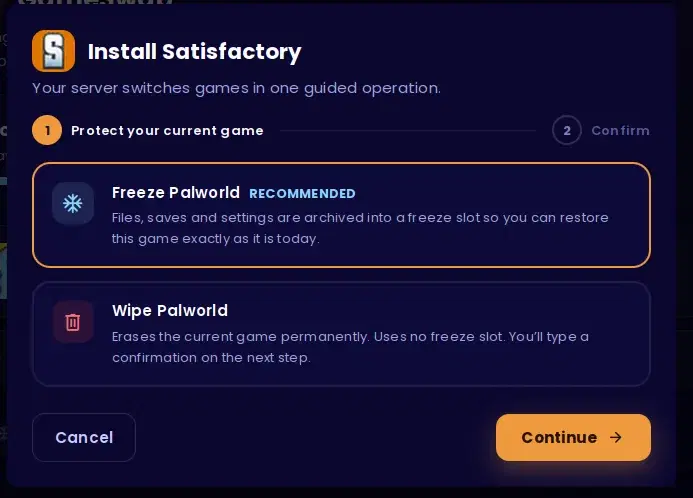
The whole thing, in two clicks: freeze what you're playing, pick what's next.
Day 7 is coming. Your server will still be standing.
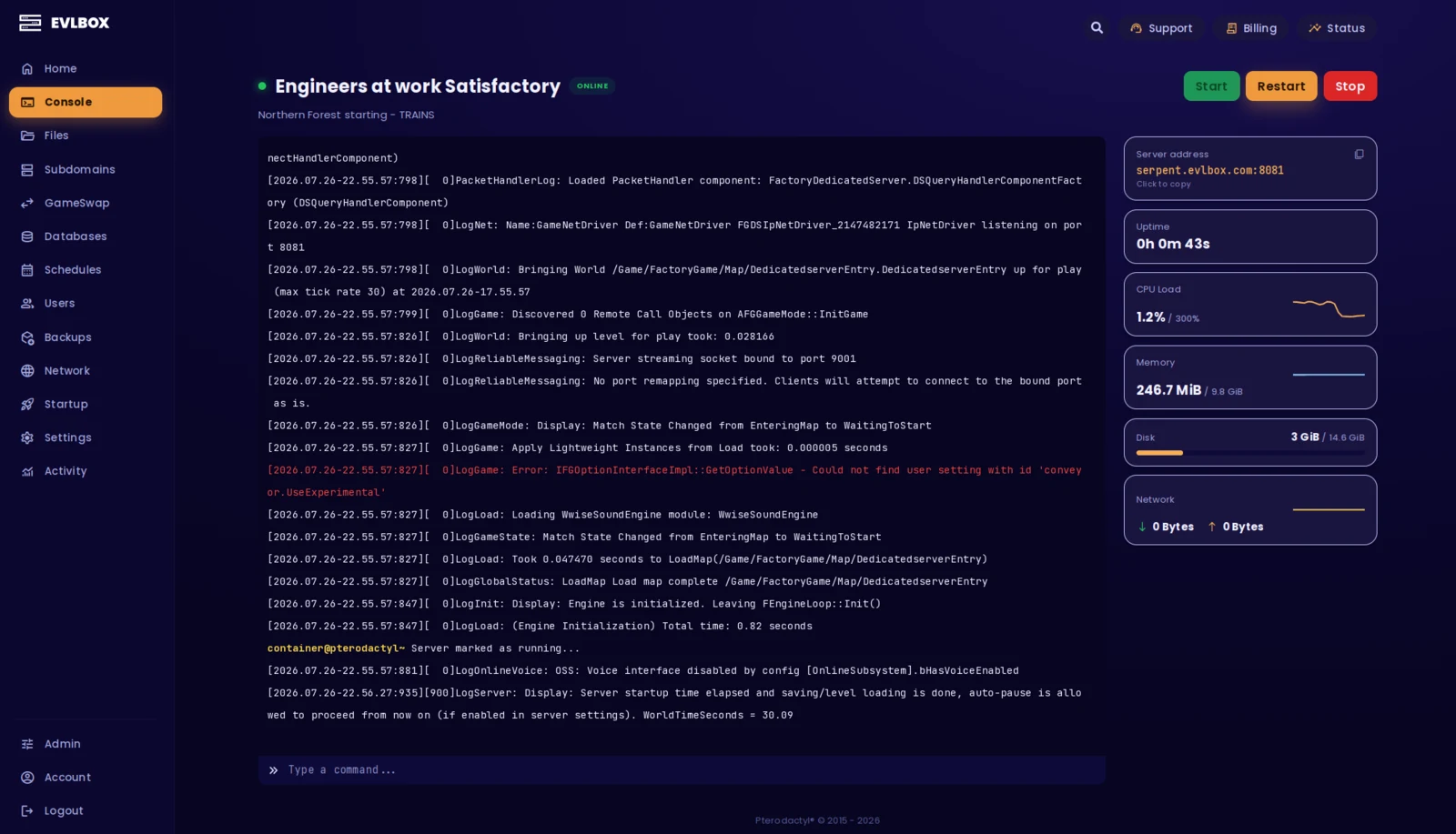
The Nitro Panel
Based on Pterodactyl.io, our control panel is packed with features and style, helping you control your server with ease and precision.
Four Locations
We have three locations throughout the United states, and one based in Falkenstein, Germany. Check your ping against our locations to decide on which is best for your server.

Getting started is easy
Select a Plan
Choose the right plan for your gaming session. This may be based on the number of players joining your server or the amount of resources the game and you will need.
Choose a Location
Depending on where you and your friends are playing from, select a location that is best for you. You can easily check your ping before buying to see the ping time of the connection from your location.
Select a billing Cycle
Choose to pay monthly, or receive a discount on quarterly, semi-annual, or yearly payment plans
Review the Specs
Review the options for Port, Memory and CPU Cores and select different options to customize the server for your gaming experience. Lots of friends joining you? You may want to increase the RAM accordingly.
Pick a Name and Complete your transaction
Name your server so your friends can find and connect to your game easily. Complete your purchase and you will receive an email within minutes with links to your server and Nitro Panel
Customize on the fly
Need to add another Gig of RAM, or add an extra CPU core? You can add/remove resources to your server at any time through our Billing Portal. No server restart needed!
Rated 4.6/5 on Trustpilot
Questions?
What makes the best 7 Days to Die server hosting?
Memory, cores and honesty, roughly in that order. 7 Days to Die is a voxel game that rebuilds chunks constantly, so it wants real RAM and real CPU rather than a slot count. That's why our plan starts at 6GB with 3 dedicated vCPU and no player limit at all. The part most hosts skip is the honesty: a 7DTD server can run console crossplay or overhaul mods, never both at once. We ship yours crossplay-ready so your console friends can join on day one, mods are one switch in the panel whenever you want them, and we tell you up front that flipping that switch after you've generated a world usually costs the save.
Is there free 7 Days to Die server hosting?
Not really, and it's worth being straight about it. You can host for free on your own PC. The dedicated server tool ships with the game on Steam and costs nothing to run. That's genuinely the right call if it's you and one friend playing for an evening and you don't mind the world going offline when you close the laptop. It stops being the right call the moment you want the world running while you're at work, want more than a couple of people on it, or would rather not hand your home IP address to strangers on the internet. Anything advertised as free hosted 7 Days to Die is a trial or an ad-funded box that gets wiped, so budget for a real server if the save is going to matter to you.
How do I host a 7 Days to Die server?
With us it's about five minutes: pick your RAM and location at checkout, and the server deploys itself, pulls roughly 13GB of game files and starts. It comes up crossplay-ready, so there's nothing to decide at checkout. You name it, set a password, choose your world settings from the Startup tab, and hit start. If you'd rather run overhaul mods, that's one switch in the panel, and it's worth throwing before you generate your world because changing it afterwards usually means a fresh one. If you'd rather host it yourself on your own hardware, The Fun Pimps publish the dedicated server tool on Steam and our docs cover the same settings either way.
Can I install 7 Days to Die server mods like Darkness Falls or Undead Legacy?
Yes. Overhauls, quality-of-life mods and server-side-only mods all run here — upload them to the Mods folder in the file manager, restart, and you're playing. It's the same plan at the same price; there's no modded tier to buy and no ticket to open. The one rule that isn't ours is that anything your players install locally needs EasyAntiCheat switched off, which means a modded world can't also be a console-crossplay world. Your server ships crossplay-ready, so flip that switch before you generate your world if you know you want an overhaul, because doing it afterwards usually costs the save. Mods are third-party software, so a broken one isn't something we can fix for you, but ask and we'll help you work out what went wrong.
Can my friends on PS5 and Xbox join my server?
Yes, and it's set up before you ever log in rather than just listed on a feature table. Console players can't type in an IP address, so the server has to be visible in the in-game browser and configured to accept them, with EasyAntiCheat left on — which is exactly how yours arrives, by default, with nothing for you to tick at checkout. The catch is that The Fun Pimps cap crossplay servers at 8 players — that's their rule for console play, not a limit we've put on your plan. Our own plan has no player cap at all, so a PC-only server can go well past that.
How much RAM does a 7 Days to Die server need?
Start at 6GB. That comfortably covers a small group on a standard map, which is where most servers begin and where a lot of them stay. Memory use in 7DTD grows with the size of the map, how much of it your group has explored and how much you've built, so a server six weeks into a big Navezgane run wants more headroom than a fresh one. You can move up to 16GB whenever it starts to feel heavy, and you don't have to guess up front — pick 6GB, play, and size up if the world grows into it.
How do backups work, and how many do I get?
Every 7 Days to Die server comes with 12 backup slots and a backup job that runs every 2 hours, set up automatically when your server deploys, so there's nothing for you to configure. Twelve slots on a two-hour schedule gives you a rolling day of restore points, and you can change the schedule or restore any of them yourself from the Nitro Panel. Backups only run while the server is running, so a stopped server isn't being backed up. They're stored off-site rather than on your server, so losing the machine doesn't mean losing your world.
What is your refund policy?
Our game servers have a 7 day refund policy. If you're not happy with the service you can cancel within the first 7 days and get a full refund. Refunds aren't automatic, so open a ticket with us, either in our Discord or through the client portal, and a person will sort it out. You need to request it within the first month of service. Services that have been in use for a month or have already renewed aren't eligible.