
7 Days to Die Server Settings
Every setting on your 7 Days to Die server lives in the Startup tab of the Nitro panel. Stop the server, change the field, start the server.
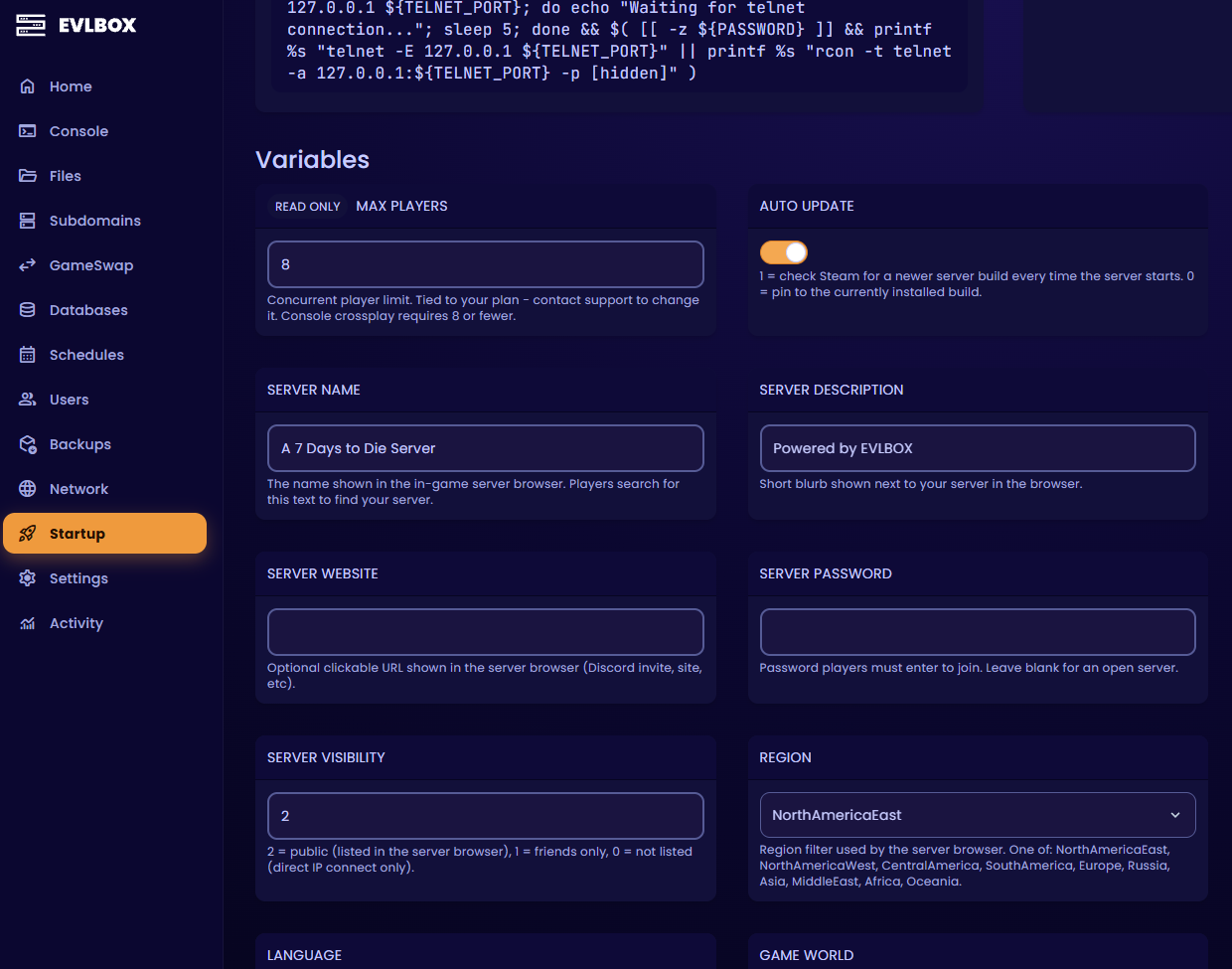
Settings labelled [Admin] are infrastructure — ports, network protocols, internal paths — and are locked so your server stays reachable. Open a ticket if you need one changed.
Sandbox Code
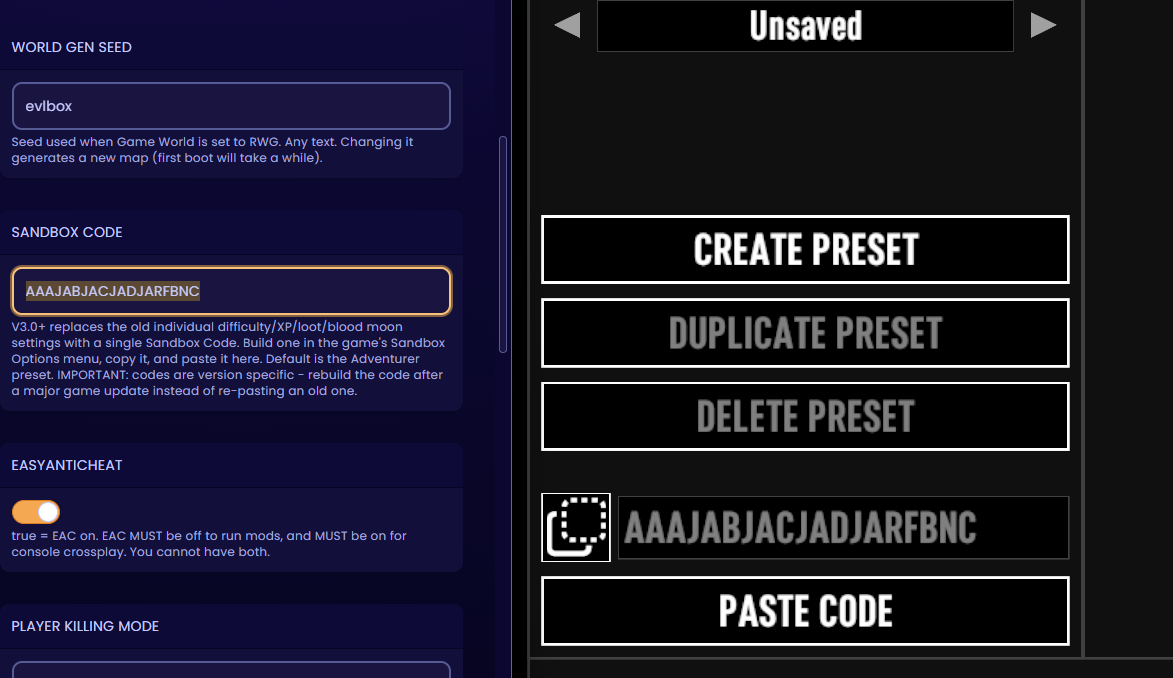
Section titled “Sandbox Code”This is the big one. V3.0 introduced over 150 sandbox options and removed 30 individual settings from the server config in the process. Difficulty, XP multiplier, loot abundance, loot respawn, zombie speed, feral sense, blood moon frequency, air drops, day length, drop-on-death and death penalty are no longer separate fields — they’re all encoded in a single Sandbox Code.
The default is AAAJABJACJADJARFBNC, which matches the old Adventurer difficulty.
To build your own:
- Launch 7 Days to Die on your PC and start creating a new game. You don’t have to actually start it.
- Open Sandbox Options and set everything how you want it — difficulty, zombie speed, loot, blood moons, traders, all of it.
- Copy the generated code.
- In the Nitro panel, stop your server, open the Startup tab, and paste it into Sandbox Code.
- Start the server.
The full option list is in the V3.0 release notes.
Server identity
Section titled “Server identity”| Field | Default | What it does |
|---|---|---|
| Server Name | A 7 Days to Die Server | The name players search for. Be specific |
| Server Description | Powered by EVLBOX | Short blurb shown next to your server |
| Server Website | (blank) | Clickable link in the browser. A Discord invite works well |
| Server Password | (blank) | Blank means anyone can join |
| Server Visibility | 2 |
2 public, 1 friends only, 0 unlisted (direct IP only) |
| Region | NorthAmericaEast | Browser region filter. Set it to where your players are |
| Language | English | Browser language filter. Use the English name, so German, not Deutsch |
| Max Players | 8 | Tied to your plan. Contact support to change it |
| Reserved Slots | 0 | Slots only usable by players at the permission level below |
| Reserved Slots Permission | 100 | Lower numbers are more privileged. 0 is owner |
| Admin Slots | 0 | Extra slots admins can use when the server is full |
| Admin Slots Permission | 0 | Permission level needed for an admin slot |
| Field | Default | What it does |
|---|---|---|
| Game World | Navezgane | Navezgane for the hand-built map, RWG for a random world, or the folder name of a world you uploaded |
| Save Name | My Game | Name of the save |
| World Gen Seed | evlbox | Seed used when Game World is RWG. Any text |
| World Gen Size | 6144 | RWG map size in metres. Multiple of 2048, from 2048 to 16384 |
Anti-cheat and crossplay
Section titled “Anti-cheat and crossplay”| Field | Default | What it does |
|---|---|---|
| EasyAntiCheat | true |
Must be false for any mod players install locally. XML-only modlets run with it on. Must be true for console crossplay |
| Allow Crossplay | false |
Lets PlayStation and Xbox players join. Needs EAC on, no mods, and 8 or fewer players |
See How to Connect for the crossplay checklist and How to Install Mods for the mod path.
Players and PvP
Section titled “Players and PvP”| Field | Default | What it does |
|---|---|---|
| Player Killing Mode | 3 |
0 no killing, 1 allies only, 2 strangers only, 3 everyone. Set 0 for pure PvE |
| Party Shared Kill Range | 100 | Blocks within which party members share kill XP and quest credit |
| New Player Safe Zone Level | 5 | Players at or below this level spawn in a no-enemy bubble |
| New Player Safe Zone Hours | 5 | In-game hours the bubble lasts |
| Bedroll Dead Zone Size | 15 | Radius in blocks around a bedroll where zombies won’t spawn |
| Bedroll Expiry Time | 45 | Days a bedroll stays active after its owner was last online |
| Persistent Player Profiles | false |
true locks each player to the character they first joined with |
| Creative Mode | false |
true gives everyone creative and cheat access. Building servers only |
Land claims
Section titled “Land claims”This group is what stops people logging off and coming back to a hole in the ground. It matters most on PvP servers.
| Field | Default | What it does |
|---|---|---|
| Land Claim Count | 1 | Claim blocks each player can place. Raise to 2 or 3 if people want a base plus a horde base |
| Land Claim Size | 41 | Blocks protected by a claim. Must be an odd number |
| Land Claim Dead Zone | 30 | Minimum distance between claims owned by non-friends |
| Land Claim Expiry Time | 7 | Days a player can be offline before protection lapses |
| Land Claim Decay Mode | 0 |
0 slow, 1 fast, 2 none (full protection until expiry) |
| Land Claim Online Durability | 4 | Block hardness multiplier while the owner is online. 0 is indestructible |
| Land Claim Offline Durability | 4 | Same, while the owner is offline. 0 is indestructible |
| Land Claim Offline Delay | 0 | Minutes after logout before online protection becomes offline protection |
Performance
Section titled “Performance”Reach for these when the server struggles, in this order.
| Field | Default | What it does |
|---|---|---|
| Max Allowed View Distance | 12 | Highest view distance a client may request, 6 to 12. Lowering this is the most effective change you can make. Try 8 |
| Max Spawned Zombies | 64 | Server-wide zombie cap and the biggest CPU cost. Capped at 90 in the panel because higher values cripple performance |
| Max Spawned Animals | 50 | Server-wide animal cap. Cheaper than zombies, not free |
| Dynamic Mesh Enabled | true |
Improves how damaged buildings behave. Turning it off frees RAM and CPU |
| Dynamic Mesh - Claims Only | true |
Restricts dynamic mesh to claimed areas. Leave this on |
| Dynamic Mesh - Claim Buffer | 3 | Chunk radius around claims that dynamic mesh covers |
Web dashboard
Section titled “Web dashboard”The game ships a built-in web dashboard with a live map. It needs a dedicated port allocated to your server.
| Field | Default | What it does |
|---|---|---|
| Web Dashboard | false |
Enables the dashboard. Needs the dashboard port allocated |
| Live Map Rendering | false |
Renders the explored map for the dashboard. Costs CPU and disk |
| Web Dashboard URL | (blank) | Leave blank unless support gave you a value |
- Check the [Admin] Web Dashboard Port value on the Startup tab and confirm it appears in your server’s allocations on the Network tab.
- If it isn’t there, see Adding Ports or open a ticket.
- Set Web Dashboard to
true, and Live Map Rendering totrueif you want the map. - Restart, then browse to your server address on the dashboard port.
Twitch integration
Section titled “Twitch integration”| Field | Default | What it does |
|---|---|---|
| Twitch Permission Level | 90 | Permission level required to use Twitch integration |
| Twitch During Blood Moon | false |
Allows Twitch-triggered spawns during blood moons. Expect lag |
Updates
Section titled “Updates”| Field | Default | What it does |
|---|---|---|
| Auto Update | 1 |
Checks Steam for a newer build on every start. Leave this on |
| Beta Branch | (blank) | Blank is the public stable build. Enter a branch name like latest_experimental to opt into a test build |
What each change needs
Section titled “What each change needs”| Change | Effect |
|---|---|
| Name, password, description, visibility, region | Restart only |
| Sandbox Code | Restart. Applies to the existing save |
| Land claims, PvP, safe zone, bedroll, performance | Restart only |
| EasyAntiCheat, Allow Crossplay | Restart. Mods stop or start loading |
| Max Players | Restart. Contact support to raise the limit |
| Game World, Save Name, World Gen Seed, World Gen Size | New world. Back up first |
| Beta Branch | Reinstall. Open a ticket |
Questions? Reach out on the support Discord or create a ticket.