 ⚔️ VALHEIM 1.0 IS HERE: fully supported and tested, with all the new world settings in the panel.

Foundry Server Hosting
Foundry server hosting for the factory building game that lets you design, automate, and scale your industrial empire with friends. EVLBOX gives you dedicated Ryzen CPU cores, NVMe storage, and a built-in Mod Loader that makes installing Steam Workshop mods painless. Pick a plan, invite your group, and start building together in minutes.
Why Host Foundry with EVLBOX?
Rated 4.6/5 on Trustpilot. We host Satisfactory, Factorio, and Foundry -- factory games are what we know.
Built-in Mod Loader
Not every host supports Foundry mods. Ours includes a Mod Loader that handles the heavy lifting: zip your workshop mods, upload once, and the tool takes it from there. No SFTP, no manual server-side setup.
Instant Setup
Your Foundry server is provisioned the moment you order. Log in, start the server, and connect. No command-line setup, no waiting on tickets.
DDoS Protected
All four server locations include DDoS protection. Your factory stays online and your home IP stays private.
Automatic Backups
Save files are backed up automatically every 2 hours to off-site storage. Restore any backup in seconds from the Nitro panel. Your progress is always safe.
Plans from $9/mo
Auto Backups
Save files backed up every 2 hours
Fast Setup
Setup in 5 minutes or less
4 Locations
Choose your optimal server location
Mod Loader
Easy workshop mod installation tool
Dallas Premium Location
Ultra-X
7-day money-back guarantee · 4.6★ on Trustpilot
Foundry Server Requirements & Plan Guide
Not sure which plan to pick? Here's what we recommend based on how you play.
Solo / 2 Players
Base plan (5GB RAM, 2 cores) handles solo and duo sessions well. Enough headroom for early and mid-game factories with moderate automation. A great starting point if you're new to the game.
3-6 Players
Builder plan (8GB RAM, 4 cores) is the sweet spot for most groups. Handles multiple players building and automating at the same time. Enough RAM for mid to late-game factory complexity and conveyor systems.
7+ Players / Heavy Automation
Pro (12GB, 6 cores) or Ultra-X (16GB, 8 cores) for large groups or late-game mega factories. Foundry's conveyor physics and voxel systems get CPU-heavy as your factory scales. The Ultra-X plan runs on a Ryzen 9 7950X with DDR5 in Dallas for maximum performance.
Disk Space
Foundry world saves grow as your factory expands. All plans include NVMe SSD storage for fast load times. Even large factories with extensive automation stay well within the included storage. You can upgrade your plan anytime without losing save data.
Need Help Getting Started?
Check out our comprehensive guides and tools
How to Connect
Learn how to connect to your FOUNDRY server and start playing with friends.
Read Guide →Adding Mods
Use our Foundry Mod Loader tool to easily install workshop mods to your server.
Read Guide →Foundry Server Features
Everything included with your Foundry dedicated server hosting plan.
Mod Loader
Zip your Steam Workshop mods, upload once through the Mod Loader, and it handles installing them to your server. No SFTP, no manual server-side file management.
Save Management
Upload single-player saves to your server or download server saves to play locally. Full save portability through the Nitro panel's file manager.
Automatic Backups
Backups run every 2 hours while your server is active. Stored off-site so your factory is protected even against hardware failures. Restore any backup from the panel.
Server Settings
Configure game settings, resource rates, and server parameters through config files in the Nitro panel. Customize the experience for your group.
Multiplayer Sessions
Your factory world stays live 24/7. Friends join and leave on their own schedule. Everyone contributes to the same shared world without needing a host online.
Auto Updates
Game updates are applied via SteamCMD on server reboot. No manual patching. Your server stays on the latest version with minimal downtime.
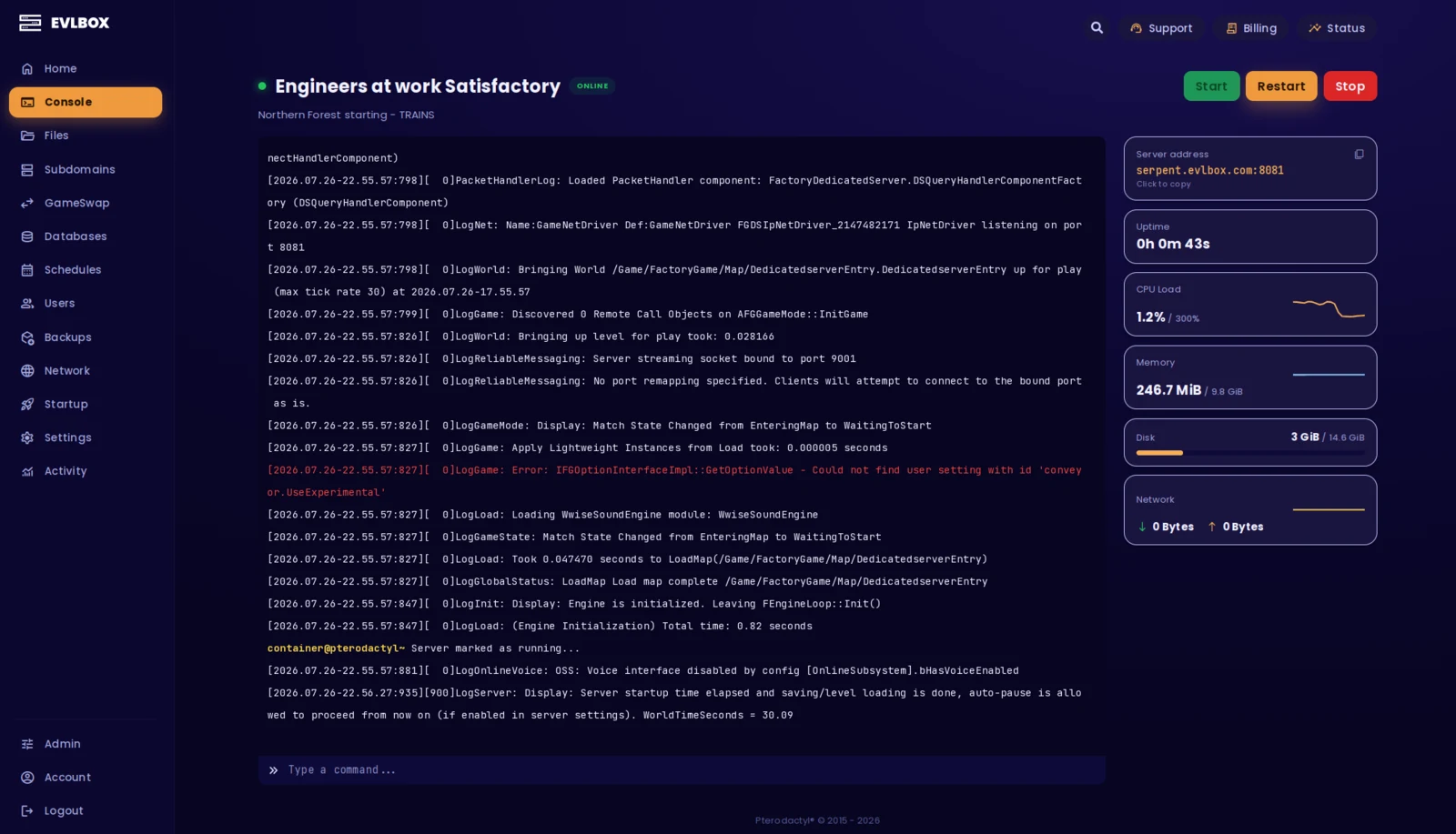
The Nitro Panel
Based on Pterodactyl.io, our control panel is packed with features and style, helping you control your server with ease and precision.
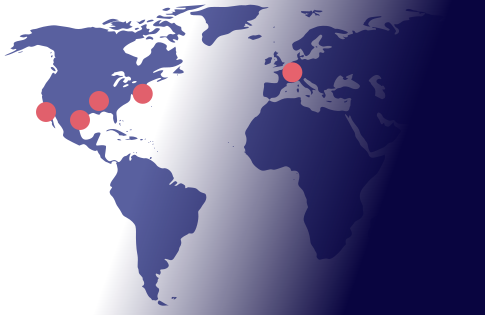
Four Locations
We have three locations throughout the United states, and one based in Falkenstein, Germany. Check your ping against our locations to decide on which is best for your server.
About Foundry
New to the game? Here's what you need to know.
Foundry is a first-person voxel-based factory building and automation game. You mine resources, design production lines, build conveyor systems, and scale up increasingly complex factories. Think Satisfactory meets Factorio with voxel terrain you can reshape and build through. This is not Foundry VTT (virtual tabletop) -- this is the factory game by Channel 3 Entertainment.
Multiplayer is where Foundry gets good. Splitting tasks between players, collaborating on factory layouts, and managing shared resources together makes large-scale builds actually achievable. A Foundry dedicated server keeps the world running around the clock so your group can drop in and build whenever they want. No one needs to host, progress is never locked to one player, and server-side performance stays consistent for everyone.
Getting started is easy
Select a Plan
Choose the right plan for your gaming session. This may be based on the number of players joining your server or the amount of resources the game and you will need.
Choose a Location
Depending on where you and your friends are playing from, select a location that is best for you. You can easily check your ping before buying to see the ping time of the connection from your location.
Select a billing Cycle
Choose to pay monthly, or receive a discount on quarterly, semi-annual, or yearly payment plans
Review the Specs
Review the options for Port, Memory and CPU Cores and select different options to customize the server for your gaming experience. Lots of friends joining you? You may want to increase the RAM accordingly.
Pick a Name and Complete your transaction
Name your server so your friends can find and connect to your game easily. Complete your purchase and you will receive an email within minutes with links to your server and Nitro Panel
Customize on the fly
Need to add another Gig of RAM, or add an extra CPU core? You can add/remove resources to your server at any time through our Billing Portal. No server restart needed!
Rated 4.6/5 on Trustpilot
Questions?
How long does it take to set up a Foundry server?
How much RAM does a Foundry server need?
Can I install mods on my Foundry server?
Can I transfer my saves to an EVLBOX Foundry server?
How many players can a Foundry server support?
What locations are available for Foundry server hosting?
What's the difference between the Foundry hosting plans?
Builder ($16/mo) — 8GB RAM, 4 cores. Best for groups of 3 to 6.
Pro ($28/mo) — 12GB RAM, 6 cores. For large groups and complex automation.
Ultra-X ($42/mo) — 16GB RAM, 8 cores, DDR5, Ryzen 9 7950X. Dallas only. Maximum performance for the biggest factories. All plans include automatic backups, mod loader access, and DDoS protection.