
Server Hibernation
Hibernation puts your game server to sleep for a small monthly fee. The server stops, and everything on it is kept exactly as you left it: your world, your files, your mods, your settings and your server address. When you want to play again you wake it, and it comes back as it was.
- It’s for a break. A few weeks or a few months away from a game, without paying for a full server and without losing anything.
- It’s the alternative to cancelling. A cancelled server is deleted. A hibernating one is waiting for you.
- You wake it whenever you like. There is no minimum or maximum time.
What’s kept and what stops
Section titled “What’s kept and what stops”| While it hibernates | |
|---|---|
| World, saves, files, mods, configuration | Kept, untouched |
| Server address (IP and port) | Kept. Players use the same address after it wakes |
| Location | Kept. The server stays in the data centre it is in |
| Sub-users and schedules | Kept |
| Storage | Kept as it is |
| Backups you already have | Kept |
| Starting the server | Not possible. Pressing Start in Nitro Panel shows an error, and that is expected |
| Players connecting | Not possible until it is awake |
| New backups | Not taken, apart from the one safety backup |
| File manager and SFTP | Still work. You can download, upload and edit files while it sleeps |
Schedules are kept but do nothing. A scheduled start or backup simply doesn’t run while the server sleeps.
How to hibernate
Section titled “How to hibernate”-
Log in to your billing area at portal.evlbox.com.
-
Select the server you want to hibernate.
-
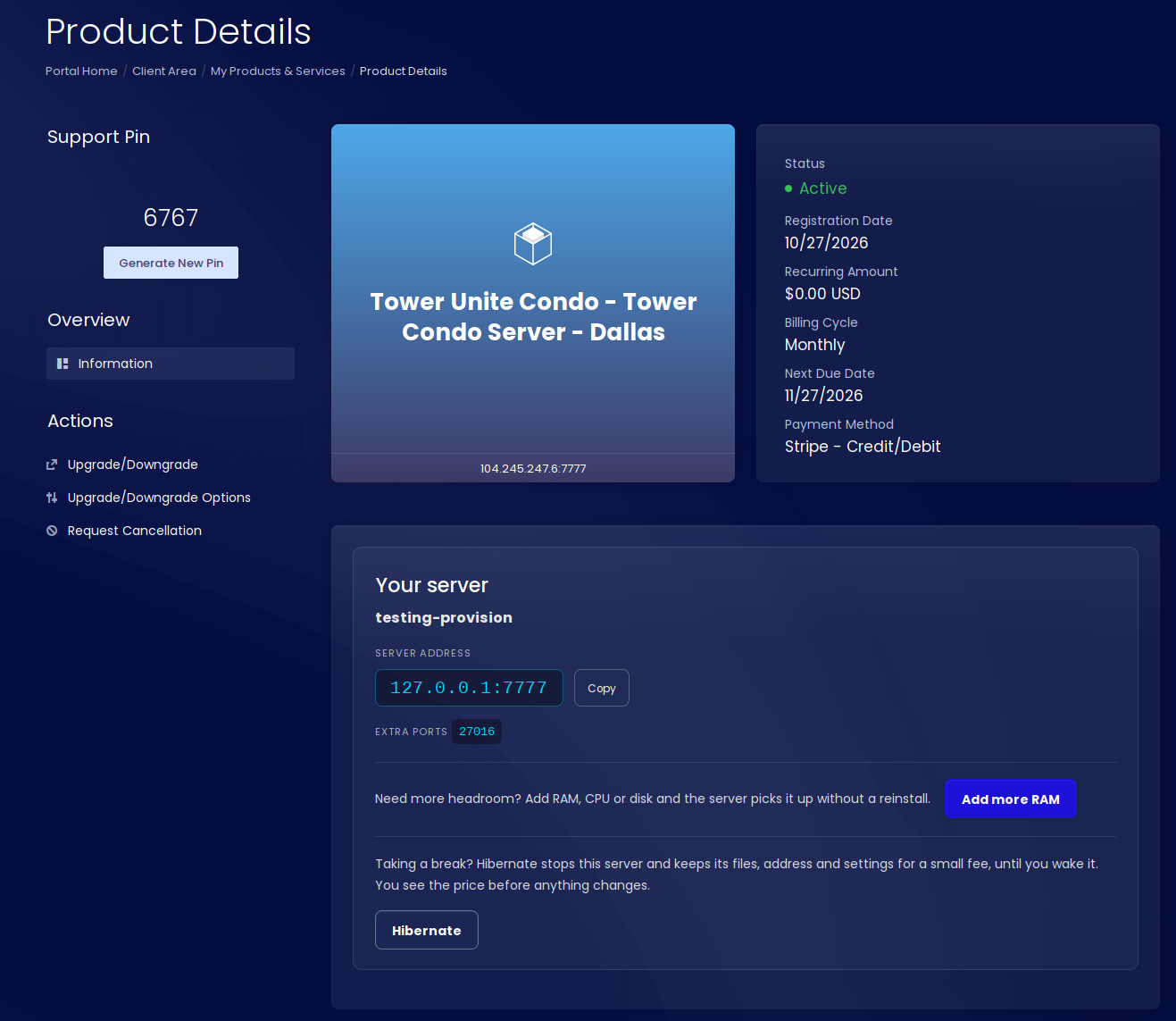
Press Hibernate. It sits on the Your server card, under the server address.
-
Check the order summary. It shows your current game plan, the Hibernate plan, and what it costs. Nothing has changed yet.
-
Confirm. The server stops and goes to sleep, usually within a minute.
You don’t need to stop the server first. We stop it for you.
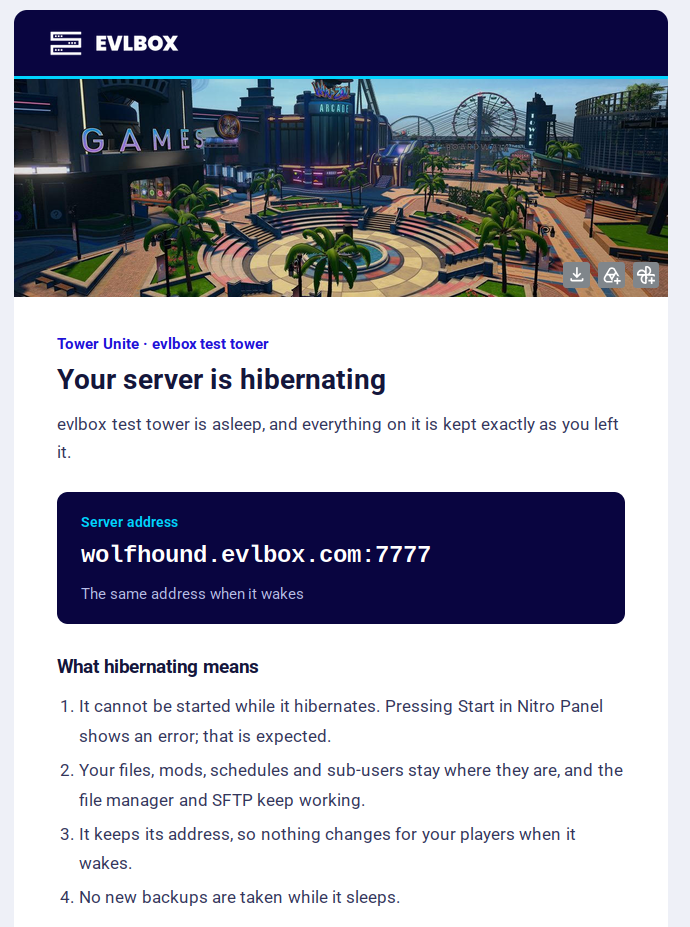
Once it’s asleep you get an email confirming the server is hibernating, with your server address and a Wake my server button.
What changes on your account
Section titled “What changes on your account”- It stays the same service. Your server is switched to a Hibernate plan in your billing area. Nothing is cancelled and nothing new is ordered.
- Your billing cycle and renewal date stay the same. Monthly stays monthly, yearly stays yearly.
- The price is shown before you confirm. That includes any difference for the time you have already paid for.
No Hibernate button?
Section titled “No Hibernate button?”One of three things:
- Hibernation isn’t available for that server yet.
- A cancellation has already been requested for it. See Thinking of cancelling?
- It’s already hibernating. The card shows Wake my server instead.
The safety backup
Section titled “The safety backup”Shortly after a server goes to sleep we take one extra backup of it, just in case.
- When. Within a short while of hibernating. The server is locked for a few minutes while the backup is taken, and during those minutes the file manager and SFTP are unavailable. After that they work again.
- Where. It’s stored off your server. In Nitro Panel it appears on the GameSwap page as Hibernation snapshot, marked as an extra slot. It doesn’t use one of your own GameSwap slots.
- What it’s for. Nothing, normally. Waking a server doesn’t use it; your server wakes with the files that are on it. It exists so that if something looks wrong after you wake up, you have a copy from the moment you went to sleep.
- How long. It can be restored once the server is awake, for about a week after waking. After that it’s removed on its own. It can’t be restored while the server is still asleep.
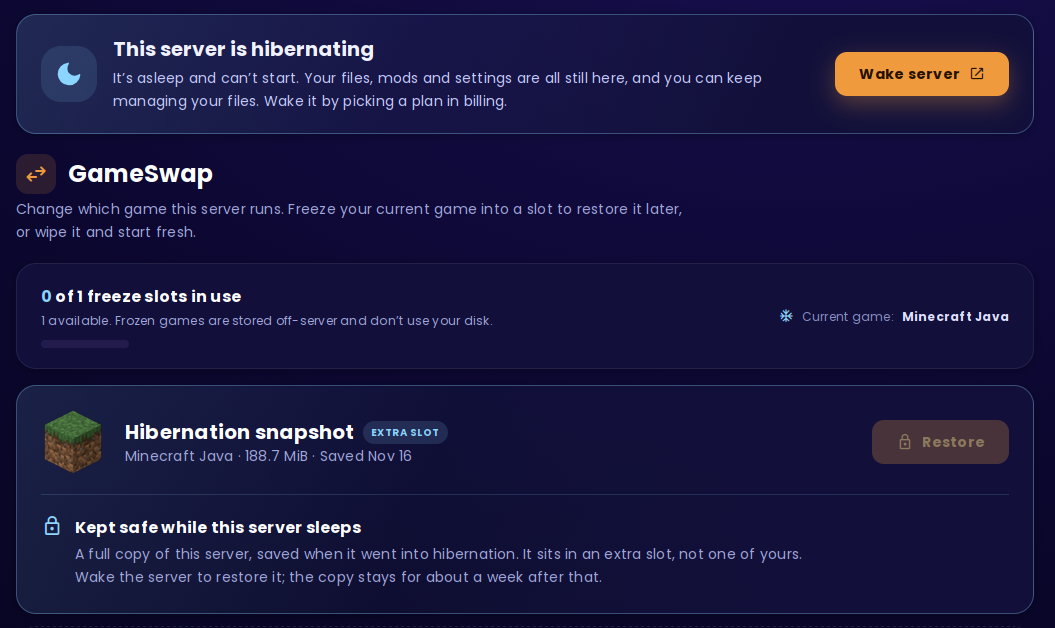
Restoring it replaces what is on the server with the copy, like any GameSwap restore. Follow the restore steps in the GameSwap guide.
Waking up
Section titled “Waking up”Waking takes about a minute, and you can do it whenever you like.
- Press Wake my server, in the hibernating email or on the server’s page in your billing area.
- Pick the game plan and billing cycle you want.
- Confirm the order. As soon as it’s paid, the server gets the memory, CPU and storage of that plan, usually within a minute.
- We start it for you and email you to say it’s awake. If it isn’t online a few minutes later, open Nitro Panel and press Start.
Good to know
Section titled “Good to know”- You get what you pick now, not what you had before. The plan you wake on decides memory, CPU, storage and backups. It can be bigger or smaller than the one you left. You can also add more memory or storage after waking, from the server’s page in your billing area.
- Same address, same files. Nothing needs to be set up again and players connect as before.
- Location doesn’t change. The server is where it always was. If you’re offered plans in several locations, pick the one for the location your server is in. The hibernating email and the server’s page both name it. Picking another location’s plan doesn’t move the server; a server in another location is a new order.
- Woke up very soon after hibernating? If the safety backup is still being taken, the server gets its resources straight away and starts a few minutes later, once the backup is done.
What you see while it sleeps
Section titled “What you see while it sleeps”In your billing area, the server’s card says “This server is hibernating”, names its location, and shows Wake my server.
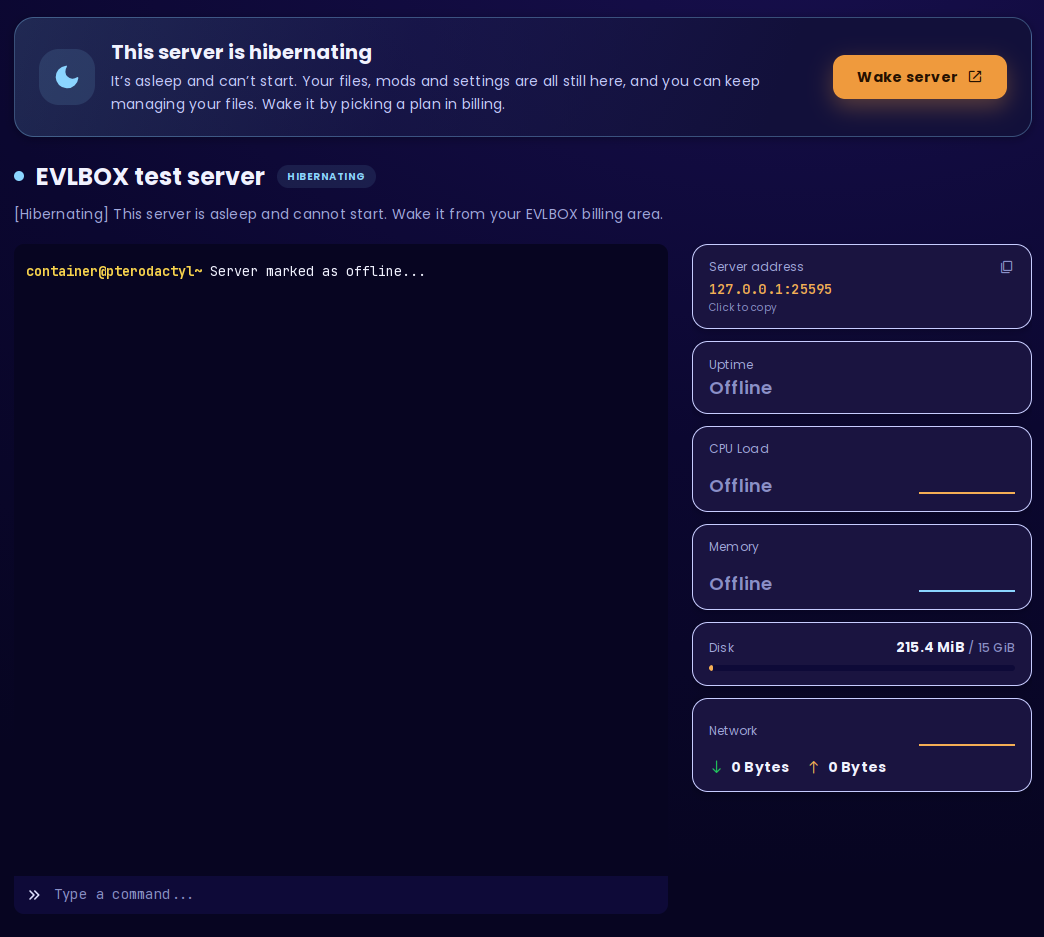
In Nitro Panel, the server is still there with all its files. A banner at the top says it’s hibernating, with a Wake server button that takes you to your billing area. The Start button doesn’t work.
On the GameSwap page, you’ll find the Hibernation snapshot card, with Restore greyed out until the server is awake.
Thinking of cancelling?
Section titled “Thinking of cancelling?”If you’re cancelling because you’re taking a break, hibernate instead. A cancelled server is deleted, along with its files and its address.
Already submitted one and would rather keep the server? Contact support as soon as you can. A server whose plan has ended is only kept for a few days before it’s removed, and after that it can’t be brought back.
Keeping a hibernating server
Section titled “Keeping a hibernating server”A hibernating server is a paid service like any other. Hibernation keeps your server for as long as the Hibernate plan is active. If the plan goes unpaid and ends, the server is removed for good a few days later, along with its safety backup.
Will I lose my world?
Section titled “Will I lose my world?”No. Your world, saves, files, mods and settings are kept untouched. See What’s kept and what stops.
Will my server address change?
Section titled “Will my server address change?”No. The server keeps its IP and port, so players use the same address after it wakes.
Can my friends still join while it hibernates?
Section titled “Can my friends still join while it hibernates?”No, not until it wakes.
Can I still get to my files?
Section titled “Can I still get to my files?”Yes. The file manager and SFTP keep working, apart from a few minutes while the safety backup is taken.
How long can a server hibernate?
Section titled “How long can a server hibernate?”As long as the Hibernate plan is paid.
How fast is waking up?
Section titled “How fast is waking up?”About a minute after payment.
Do I get my old plan back when I wake?
Section titled “Do I get my old plan back when I wake?”You pick a plan when you wake, and the server gets the memory, CPU and storage of that plan. See Waking up.
Can I move to another location when I wake?
Section titled “Can I move to another location when I wake?”No. The server stays in the location it’s in. A server in another location is a new order.
Why can’t I press Start?
Section titled “Why can’t I press Start?”The server is hibernating. Wake it from your billing area.
Why did my server not start after waking?
Section titled “Why did my server not start after waking?”Usually storage: the plan you woke on has less storage than your files take up. Add storage or remove some files, then press Start. If that isn’t it, contact support.
What is the “Hibernation snapshot” on my GameSwap page?
Section titled “What is the “Hibernation snapshot” on my GameSwap page?”It’s the safety backup taken when your server went to sleep. It sits in an extra slot, not one of yours. See The safety backup.
Why is there no Hibernate button on my server?
Section titled “Why is there no Hibernate button on my server?”Hibernation isn’t available for that server yet, a cancellation has already been requested for it, or it’s already hibernating. See No Hibernate button?
I have several servers. Which one hibernates?
Section titled “I have several servers. Which one hibernates?”Only the one whose Hibernate button you pressed.